Local SEO

Does Your Website Support Your Google Business Profile?

A Google Business Profile website optimization audit answers one question: does your website support the profile customers find on Google. The two should agree on your details and reinforce each other with the right content. GMB Everywhere’s Website Audit checks both in two halves, GBP & Website Match and Website Quality. This guide is the overview, with links to a focused walkthrough for every check.

Audit Your GBP for Free
Free to Start 250,000+ Users

June 12, 2026

What a Website Audit for Your Profile Covers

A Google Business Profile website optimization audit checks one thing above all: does your website back up the profile customers find on Google. The two should tell the same story, from your name and hours to the keywords and content on the page. Google rewards that consistency, and its guidance on accurate business info points the same way.

The Website Audit in GMB Everywhere’s Google Business Profile audit tool runs this in two halves: GBP & Website Match for consistency, and Website Quality for the page itself. This guide is the map; each check links to a focused walkthrough.

The Two Halves of the Audit

Every check falls into one of these groups.

Match

GBP & Website Match

NAP, title and meta, local keywords, operating hours, and category pages, all compared against your profile.

Quality

Website Quality

Content depth, a spelling check, and your header structure, scored on the page itself.

Outcome

One clear story

Fix what the audit flags and your site and profile finally agree, the way Google wants to see them.

Run the Whole Audit, Then Drill In

Three moves take you from a full scan to a prioritized fix list.

1

Review GBP & Website Match

This half compares the details on your website against your profile and marks each one. It covers your NAP, whether your primary category and city appear in your title and meta, your local keywords, your hours day by day, and your category pages.
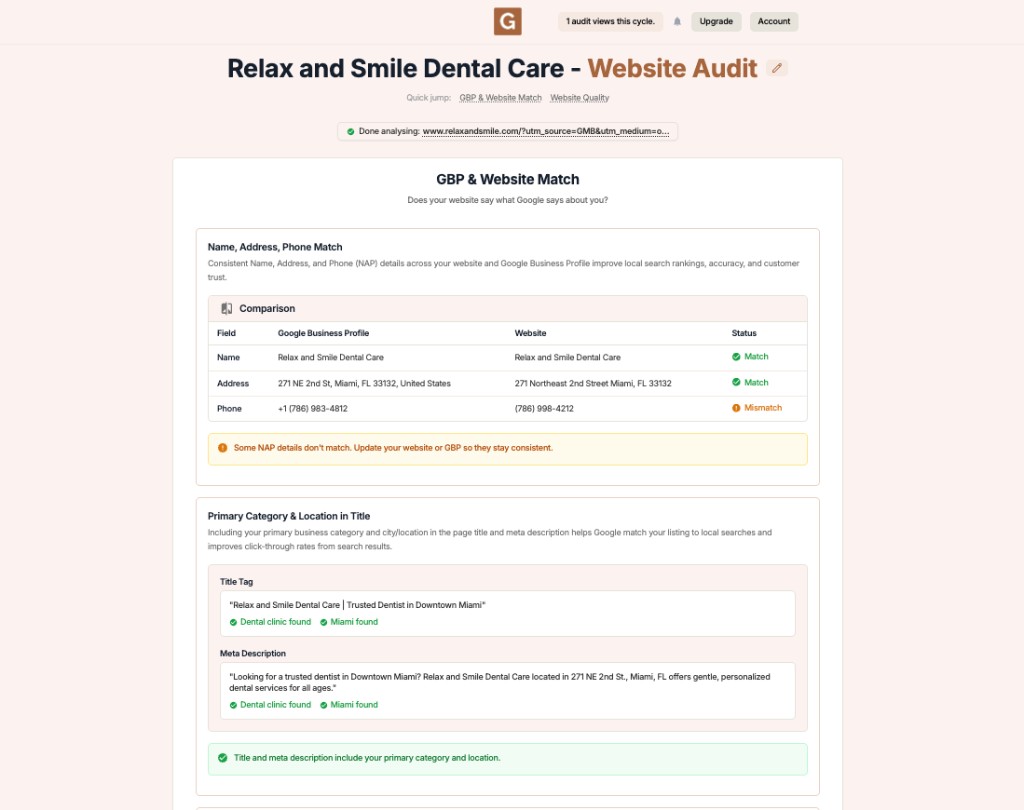
GMB Everywhere Website Audit showing the GBP and Website Match section comparing NAP and title and meta against a Google Business Profile

What it checks

  • Name, address, and phone consistency
  • Primary category and city in title and meta
  • Local keywords in content and headings
  • Operating hours, day by day
  • A page for each category

Where to find it

Start with the NAP match check, then work down to hours and category pages.

2

Review Website Quality

The second half looks at the quality of the page itself, independent of your profile. It scores how much content you have against simple bands, runs a spelling check that points to the exact word, and lays out your header hierarchy.

What it scores

  • Content depth against word-count bands
  • Spelling, with the exact flagged word
  • Header structure from H1 to H6

Where to find it

Dig deeper with content length, header structure, and spelling.

3

Prioritize and re-run

Work top to bottom. Fix the consistency issues first because they are the clearest signals, then improve content quality. Re-run the audit after each round to confirm the flags clear.

Fix

New to the specifics? The city and category guide and the local keywords guide are good next stops.

Audit Your Whole Setup with GMB Everywhere

1

Install and open

Add GMB Everywhere to Chrome and open your business in Google Maps.

2

Run the Website Audit

Run the audit and read both halves: GBP & Website Match and Website Quality.

3

Fix top down

Clear consistency flags first, then content quality, and re-run to confirm.

What Google Sees: Drifting vs. Supporting

Site that ignores the profile

  • NAP and hours drift from the profile
  • Title and meta miss the category and city
  • Thin pages with no category support

Site that supports the profile

  • NAP and hours match the profile
  • Category and city sit in title and meta
  • Each core category has a solid page

Quick FAQs

What is a Google Business Profile website audit?

It is a check of whether your website supports your profile. The Website Audit compares the two for consistency and also scores the quality of your page content.

What does the audit actually check?

Two halves: GBP & Website Match (NAP, title and meta, local keywords, hours, category pages) and Website Quality (content depth, spelling, header structure).

Where should I start?

Start with consistency. The NAP match check is the simplest high-value fix, then move through hours, keywords, and category pages.

How long does it take?

Running the audit takes a minute. Fixing what it finds depends on your site, but most consistency issues are quick edits you can make the same day.

Is the Website Audit free to try?

You can install GMB Everywhere and start auditing for free. Add it to Chrome, open your business, and run the Website Audit on your own listing.

Features

Complete suite of professional tools for Google Business Profile management

View Competitor Category

How to use:

Open any business on Google Maps - primary and secondary categories display automatically beside the profile

Features:

  • Always Free to Use
  • Find Primary Category
  • Find All Secondary Categories
  • Direct Link to Category Finder
  • Always Displayed on Google Maps

Local Scan

How to use:

Search for any term on Google Maps - click the Local Scan button to compare all GBPs

Features:

  • Compare Multiple Competitors in One Click
  • Compare Competitors Categories & Services
  • Compare Competitor Reviews Across GBPs
  • Compare Competitor Location Advantage
  • Compare Attributes & Other Data

AI Tools

How to use:

Open any business on Google Maps - click the 'AI' button beside the GBP to use AI features

Features:

  • AI GBP Post Generator
  • AI Review Response Generator
  • AI GBP Description Generator
  • AI Q&A Section Generator
  • AI Facebook Post Generator

Category Finder

How to use:

Open any business on Google Maps - click the 'Find more' button beside categories

Features:

  • Find Related Categories Based on Real Data
  • Get Service Suggestions for Each Category
  • Analyze Traffic Potential per Category
  • Extract Category Suggestions from Website URL
  • Category Suggestions from AI Chat

Basic Audit

How to use:

Open any business on Google Maps - click the 'Basic Audit' button beside the GBP

Features:

  • GBP Info like Place ID, Knowledge ID, CID & More
  • Find Services, Attributes, Categories & More
  • GBP Links like Review Request, Service/Product & More
  • Compare on External Maps Outside Google Maps
  • 40+ Additional Data Points & Tools

Review Audit

How to use:

Open any business on Google Maps - click the 'Review Audit' button beside the GBP

Features:

  • Track Review & Rating Trends Over Time
  • Detailed Review Analysis for GBP
  • Discover Common Keywords in Reviews
  • Custom Review Filtering for Analysis
  • Other Review Features

Teleport

How to use:

Open any business on Google Maps - click the 'Teleport' button beside the GBP

Features:

  • Find GBP Rank at Any Location
  • Find GBP Rank for Any Search Term
  • Find GBP Competitors at Any Location
  • Customizable Location Settings
  • Can Run for Any Location Worldwide

Post Audit

How to use:

Open any business on Google Maps - click the 'Post Audit' button beside the GBP

Features:

  • GBP Posts Timeline Visualization
  • Track Total GBP Posts & Post Frequency
  • Analyze GBP Post Content & Character Count
  • Monitor GBP Posts with Links & Media
  • GBP Post Performance Insights

Loved by Local SEO Experts

Join thousands of agencies and businesses using GMB Everywhere daily

Audit Your Website and Profile with GMB Everywhere

Join 250,000+ users who use GMB Everywhere to analyze competitors and optimize their Google Business Profiles

Install GMB Everywhere - It’s Free

More GBP Guides