Local SEO

Are Your City and Category in Your Title Tag for Local SEO?

Learning how to add your city to your title tag and meta description is one of the simplest local SEO wins, and most sites get it wrong. Your title is the first thing a searcher reads and a clear signal to Google about what you do and where. GMB Everywhere’s Website Audit checks whether your primary category and city actually appear there. Here is how to read the check and fix it without keyword stuffing.

Audit Your GBP for Free
Free to Start 250,000+ Users

June 12, 2026

Why Your Title Tag Should Name the Place

Your title tag and meta description are the first things a searcher reads, and they help Google connect your page to local queries. When your primary category and city are missing, you are leaving the strongest local signal off the most visible line. Google’s own advice on representing your business rewards clarity over cleverness.

This is not about stuffing keywords; it is about saying plainly what you do and where. The Website Audit in GMB Everywhere’s Google Business Profile audit tool checks whether your primary category and city actually appear in your title and meta, and flags the page when they do not.

What the Title and Meta Check Looks For

The audit checks the two lines a searcher sees before they click.

Category

Your primary category

It confirms the service you lead with on your profile appears in your title and meta.

City

Your location

It checks that your city shows up so Google can tie the page to local searches.

Plain words

Natural phrasing

The aim is a readable title, not a list of keywords jammed together.

Put Your Category and City Up Front

Read the check, rewrite the two lines, then confirm.

1

Read the title and meta check

Run the Website Audit and open GBP & Website Match. The audit reports whether your primary category and city are present in your page title tag and meta description.
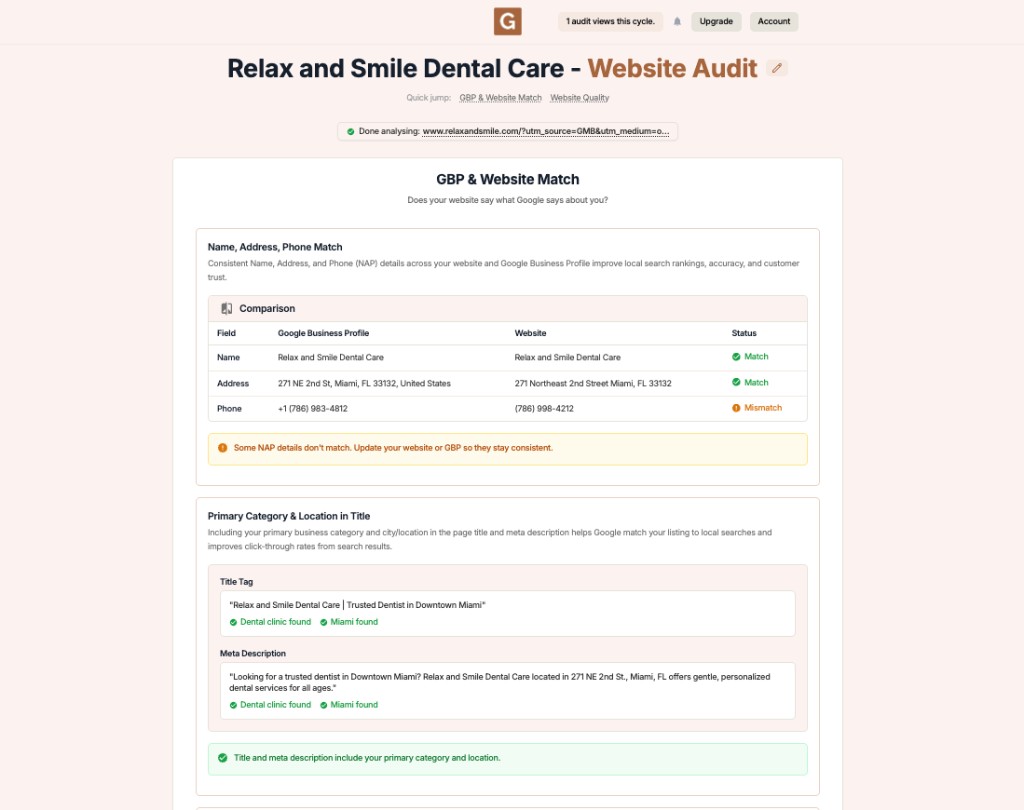
GMB Everywhere Website Audit showing whether the primary category and city appear in a page title tag and meta description

Fix

If the check is missing either piece, your title or meta does not name your main service or your city in a way the audit can see.

2

Rewrite for clarity, not stuffing

Rewrite the title and description so they read naturally while including your category and city. Lead with the service, place the city near it, and keep it human.

Weak title

  • Home | Welcome to Our Site
  • Best Cheap Plumber Plumbing Plumber City Plumber
  • A title with no city and no service named

Clear title

  • Emergency Plumber in Austin, TX | Same-Day Service
  • Austin Family Dentist — Gentle Care for All Ages
  • Title leads with the service and names the city once
3

Keep it short and re-run

Keep the title concise so it does not truncate in search, and let the meta description add the supporting detail. Then re-run the audit to confirm both checks pass.

Fix

Pair this with strong on-page wording from the local keywords check so the body backs up what the title promises.

Sharpen Your Title and Meta with GMB Everywhere

1

Run the audit

Open your business and run the Website Audit with GMB Everywhere.

2

Check title and meta

See whether your primary category and city appear in both lines.

3

Edit and re-run

Update the title and description, then run the audit again to confirm.

What Google Sees: Vague vs. Clear

Vague title and meta

  • No city or service named
  • Reads like a keyword list
  • Google struggles to place the page locally

Clear title and meta

  • Service and city named naturally
  • Reads like a human wrote it
  • Easy for Google to match to local searches

Quick FAQs

Where exactly should the city go?

Put your city in the title near your main service, and again in the meta description. One natural mention in each is enough; you do not need to repeat it.

Will adding a city help me rank locally?

Naming your city and service clearly helps Google understand the page is relevant to local searches. It is one signal among many, paired with consistent details across your site and profile.

How long should my title tag be?

Keep it concise so it does not get cut off in search results. Lead with the most important words, your service and city, and let the meta description carry the rest.

Is keyword stuffing a problem?

Yes. Repeating the same terms reads poorly and can work against you. Write a clear, human title that names your service and city once.

What if I have several locations?

Give each location its own page with its own title and city, the same way you give core services their own category pages.

Features

Complete suite of professional tools for Google Business Profile management

View Competitor Category

How to use:

Open any business on Google Maps - primary and secondary categories display automatically beside the profile

Features:

  • Always Free to Use
  • Find Primary Category
  • Find All Secondary Categories
  • Direct Link to Category Finder
  • Always Displayed on Google Maps

Local Scan

How to use:

Search for any term on Google Maps - click the Local Scan button to compare all GBPs

Features:

  • Compare Multiple Competitors in One Click
  • Compare Competitors Categories & Services
  • Compare Competitor Reviews Across GBPs
  • Compare Competitor Location Advantage
  • Compare Attributes & Other Data

AI Tools

How to use:

Open any business on Google Maps - click the 'AI' button beside the GBP to use AI features

Features:

  • AI GBP Post Generator
  • AI Review Response Generator
  • AI GBP Description Generator
  • AI Q&A Section Generator
  • AI Facebook Post Generator

Category Finder

How to use:

Open any business on Google Maps - click the 'Find more' button beside categories

Features:

  • Find Related Categories Based on Real Data
  • Get Service Suggestions for Each Category
  • Analyze Traffic Potential per Category
  • Extract Category Suggestions from Website URL
  • Category Suggestions from AI Chat

Basic Audit

How to use:

Open any business on Google Maps - click the 'Basic Audit' button beside the GBP

Features:

  • GBP Info like Place ID, Knowledge ID, CID & More
  • Find Services, Attributes, Categories & More
  • GBP Links like Review Request, Service/Product & More
  • Compare on External Maps Outside Google Maps
  • 40+ Additional Data Points & Tools

Review Audit

How to use:

Open any business on Google Maps - click the 'Review Audit' button beside the GBP

Features:

  • Track Review & Rating Trends Over Time
  • Detailed Review Analysis for GBP
  • Discover Common Keywords in Reviews
  • Custom Review Filtering for Analysis
  • Other Review Features

Teleport

How to use:

Open any business on Google Maps - click the 'Teleport' button beside the GBP

Features:

  • Find GBP Rank at Any Location
  • Find GBP Rank for Any Search Term
  • Find GBP Competitors at Any Location
  • Customizable Location Settings
  • Can Run for Any Location Worldwide

Post Audit

How to use:

Open any business on Google Maps - click the 'Post Audit' button beside the GBP

Features:

  • GBP Posts Timeline Visualization
  • Track Total GBP Posts & Post Frequency
  • Analyze GBP Post Content & Character Count
  • Monitor GBP Posts with Links & Media
  • GBP Post Performance Insights

Loved by Local SEO Experts

Join thousands of agencies and businesses using GMB Everywhere daily

Check Your Title and Meta with GMB Everywhere

Join 250,000+ users who use GMB Everywhere to analyze competitors and optimize their Google Business Profiles

Install GMB Everywhere - It’s Free

More GBP Guides