Local SEO

Does Your Website Match Your Google Business Profile? Run a NAP Check

The quickest way to check whether your website matches your Google Business Profile is to compare the details customers and Google rely on most — your name, address, phone, hours, and categories. When those disagree across the two, Google has to guess which version is right, and that uncertainty costs you local visibility. Here is how to spot every mismatch in minutes and line them back up.

Audit Your GBP for Free
Free to Start 250,000+ Users

June 12, 2026

Why Your Website and Profile Need to Agree

Google cross-references the details it finds about your business. When your website, your profile, and other listings tell a consistent story, that is a trust signal. When they conflict, Google has to guess which version to show — and that uncertainty can quietly cost you visibility. Keeping your business information accurate is one of the highest-value local SEO basics.

Mismatched hours or phone numbers also frustrate customers at the exact moment they want to call or visit. The goal is simple: one set of facts everywhere. GMB Everywhere’s Google Business Profile audit tool includes a Website Audit that compares the two and shows you exactly where they drift apart.

Three Things That Must Tell the Same Story

The Website Audit groups its findings around the signals Google and customers rely on most.

Contact details

Name, address, phone

Your core NAP should read identically on your site and your profile, down to the suite number and phone format.

When you’re open

Hours, day by day

If your website hours and profile hours disagree, Google may override what you set and show the wrong day.

What you do

Categories & service pages

Each profile category is stronger when a matching page on your site backs it up with real content.

Run the Website Audit and Read Each Check

Add GMB Everywhere to Chrome, open your business, and run the Website Audit. Results split into GBP & Website Match and Website Quality.

1

Name, address, and phone (NAP)

The audit compares your core contact details and marks each field Match or Mismatch. Usual culprits: a shortened business name, a missing suite or street suffix, and a different phone format.
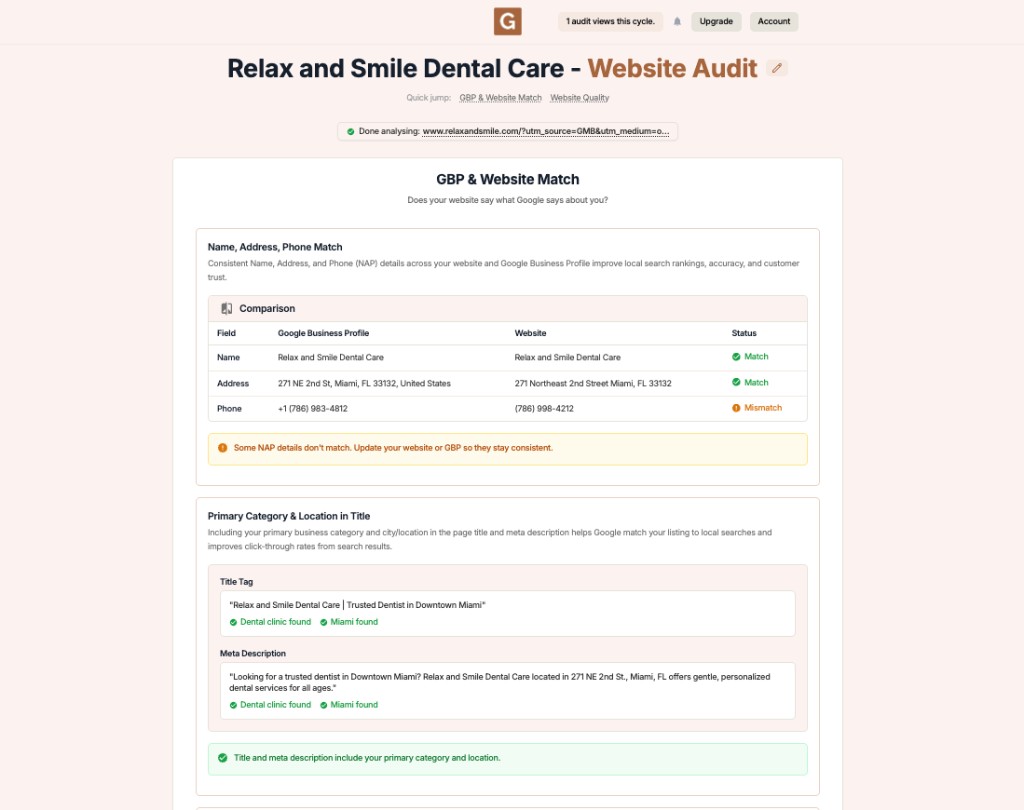
GMB Everywhere Website Audit showing a name, address, and phone comparison between a Google Business Profile and a website

Fix

Decide which version is correct, then update the other source so they line up character‑for‑character.

2

Category and city in your title and meta

The audit checks whether your primary category and city appear in your page title tag and meta description — the first things a searcher sees and a signal that helps Google match your page to local searches.

Fix

If the check is missing, add your main service and city to the title and description in plain, natural language — no keyword stuffing.

3

Hours, local keywords, and category pages

The audit lines up your hours day by day and flags any day where your website and profile disagree. It also confirms your city and neighborhood terms appear in your content and headings, and checks whether each profile category has a matching page.
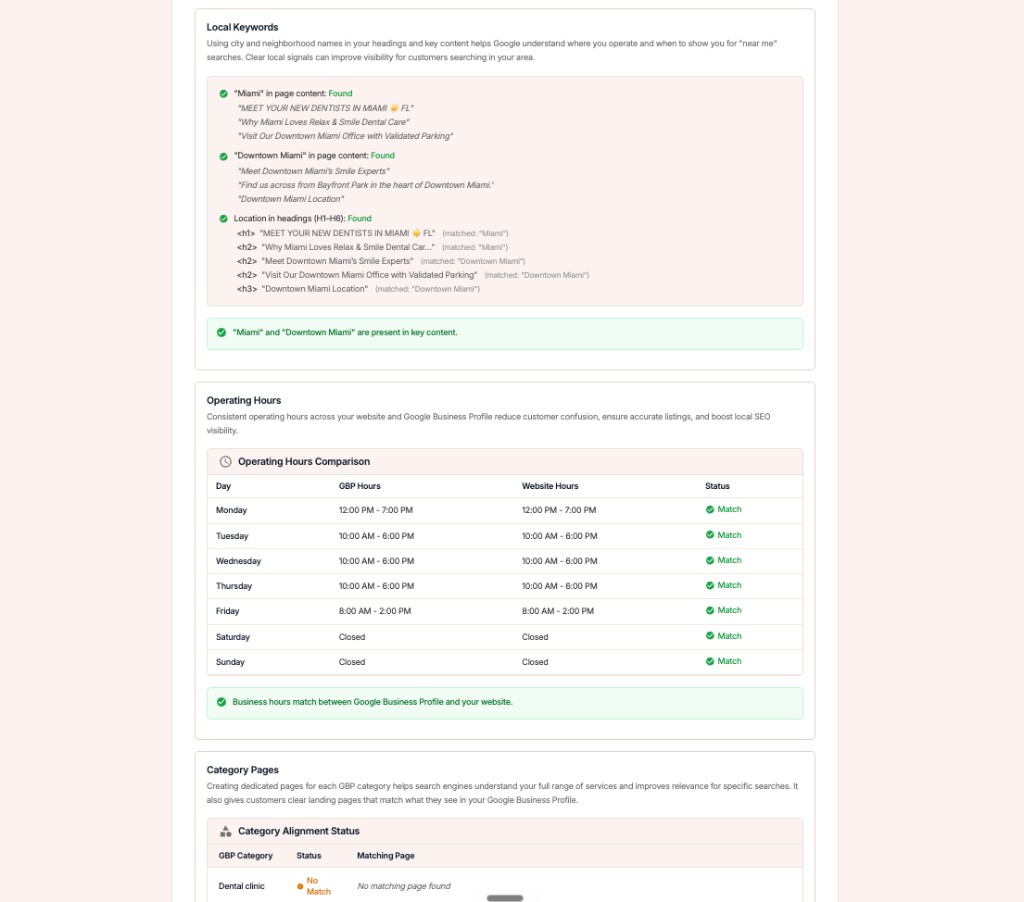
GMB Everywhere Website Audit showing local keyword checks, a day-by-day operating hours comparison, and category page alignment

Fix

Where a category shows No Match, add a dedicated page for that service. Unsure which to align to? See how to choose your profile categories.

4

Website quality: content, spelling, headers

The second half scores your content depth against simple bands, runs a spelling check that points to the exact word, and lays out your header structure so you can confirm a clean H1–H6 hierarchy.
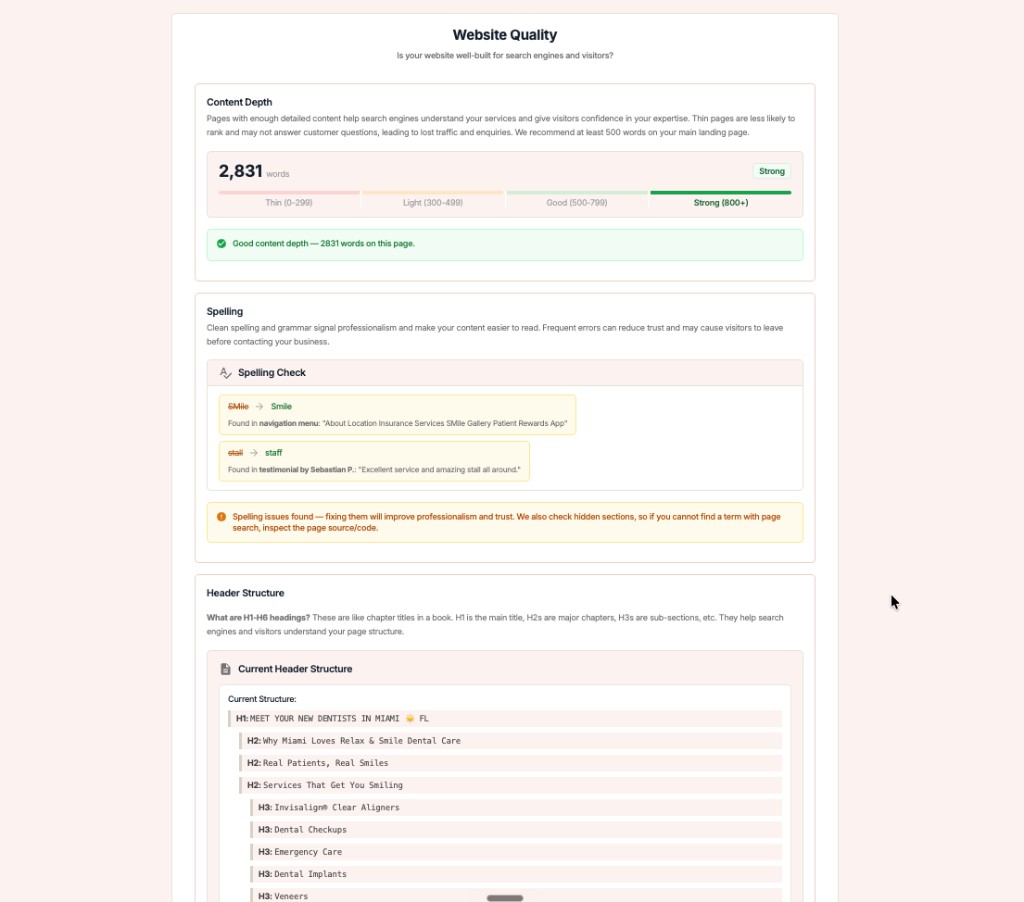
GMB Everywhere Website Audit showing content depth score, spelling check, and header structure for a local business page

Fix the Mismatches You Find

1

Pick one source of truth

Decide the correct name, address, phone, and hours, and write them down.

2

Update site, then profile

Correct your website first, then mirror the same details on your profile so they agree.

3

Re-run the audit

Confirm each field now shows Match, and make it a routine — details drift over time.

What Google Sees: Conflicting vs. Aligned

Conflicting setup

  • Name or phone formatted differently on the site and profile
  • Hours disagree on at least one day
  • Category with no matching page; city missing from title and meta

Aligned setup

  • NAP identical on the site and profile, character for character
  • Hours match every day across both
  • Each category has a page; city and category sit in title and meta

Quick FAQs

What is NAP and why does it matter?

NAP stands for Name, Address, and Phone number. Keeping it identical across your website and profile is a trust signal that supports local rankings and prevents customer confusion.

Why does Google keep changing my hours?

Google may adjust your hours when it finds conflicting information on your website or elsewhere. Making your website match your profile removes the conflict it is trying to resolve.

Do I really need a page for every category?

A dedicated page for each main service gives customers a clear landing point and helps Google connect your profile categories to real content on your site.

How often should I run a Website Audit?

A quick check each quarter, plus any time you change hours, move, or rebrand, is enough to catch drift before it affects your visibility.

Features

Complete suite of professional tools for Google Business Profile management

View Competitor Category

How to use:

Open any business on Google Maps - primary and secondary categories display automatically beside the profile

Features:

  • Always Free to Use
  • Find Primary Category
  • Find All Secondary Categories
  • Direct Link to Category Finder
  • Always Displayed on Google Maps

Local Scan

How to use:

Search for any term on Google Maps - click the Local Scan button to compare all GBPs

Features:

  • Compare Multiple Competitors in One Click
  • Compare Competitors Categories & Services
  • Compare Competitor Reviews Across GBPs
  • Compare Competitor Location Advantage
  • Compare Attributes & Other Data

AI Tools

How to use:

Open any business on Google Maps - click the 'AI' button beside the GBP to use AI features

Features:

  • AI GBP Post Generator
  • AI Review Response Generator
  • AI GBP Description Generator
  • AI Q&A Section Generator
  • AI Facebook Post Generator

Category Finder

How to use:

Open any business on Google Maps - click the 'Find more' button beside categories

Features:

  • Find Related Categories Based on Real Data
  • Get Service Suggestions for Each Category
  • Analyze Traffic Potential per Category
  • Extract Category Suggestions from Website URL
  • Category Suggestions from AI Chat

Basic Audit

How to use:

Open any business on Google Maps - click the 'Basic Audit' button beside the GBP

Features:

  • GBP Info like Place ID, Knowledge ID, CID & More
  • Find Services, Attributes, Categories & More
  • GBP Links like Review Request, Service/Product & More
  • Compare on External Maps Outside Google Maps
  • 40+ Additional Data Points & Tools

Review Audit

How to use:

Open any business on Google Maps - click the 'Review Audit' button beside the GBP

Features:

  • Track Review & Rating Trends Over Time
  • Detailed Review Analysis for GBP
  • Discover Common Keywords in Reviews
  • Custom Review Filtering for Analysis
  • Other Review Features

Teleport

How to use:

Open any business on Google Maps - click the 'Teleport' button beside the GBP

Features:

  • Find GBP Rank at Any Location
  • Find GBP Rank for Any Search Term
  • Find GBP Competitors at Any Location
  • Customizable Location Settings
  • Can Run for Any Location Worldwide

Post Audit

How to use:

Open any business on Google Maps - click the 'Post Audit' button beside the GBP

Features:

  • GBP Posts Timeline Visualization
  • Track Total GBP Posts & Post Frequency
  • Analyze GBP Post Content & Character Count
  • Monitor GBP Posts with Links & Media
  • GBP Post Performance Insights

Loved by Local SEO Experts

Join thousands of agencies and businesses using GMB Everywhere daily

Audit Your Website and Profile with GMB Everywhere

Join 250,000+ users who use GMB Everywhere to analyze competitors and optimize their Google Business Profiles

Install GMB Everywhere - It’s Free

More GBP Guides