Local SEO

Spelling and Trust: Why Website Typos Hurt Your Local SEO

If you have asked whether spelling errors affect SEO, the honest answer is that typos rarely sink a page alone but they quietly erode the trust local customers run on. Clean copy signals you take your work seriously, and that credibility helps turn visitors into calls. GMB Everywhere’s Website Audit runs a spelling check that points to the exact word. Here is how to read it and keep your pages polished.

Audit Your GBP for Free
Free to Start 250,000+ Users

June 12, 2026

Why Typos Quietly Cost You Trust

A page full of typos tells a visitor you might be careless with their job too, and trust is most of the local buying decision. Spelling will not sink a page on its own, but it chips away at the credibility that turns a visitor into a call. Google’s SEO starter guide ties good content quality, including the basics, to better results.

The hard part is that you stop seeing your own typos after the tenth read. The Website Audit in GMB Everywhere’s Google Business Profile audit tool runs a spelling check that points to the exact word, so you can fix it instead of hunting for it.

What the Spelling Check Does

The audit makes errors easy to find and fix.

Detection

Points to the word

It flags the exact word so you do not have to re-read the whole page to find the typo.

Trust

Credibility on the line

Clean copy signals you take your work seriously, which matters most for local trust.

Quick

A fast pass

Running the check takes a moment and catches errors you stopped noticing long ago.

Catch the Typos You Stopped Seeing

Read the flags, fix the real errors, then make it a habit.

1

Read the spelling flags

Run the Website Audit and open Website Quality. The spelling check lists the words it flags so you can see exactly what to fix.
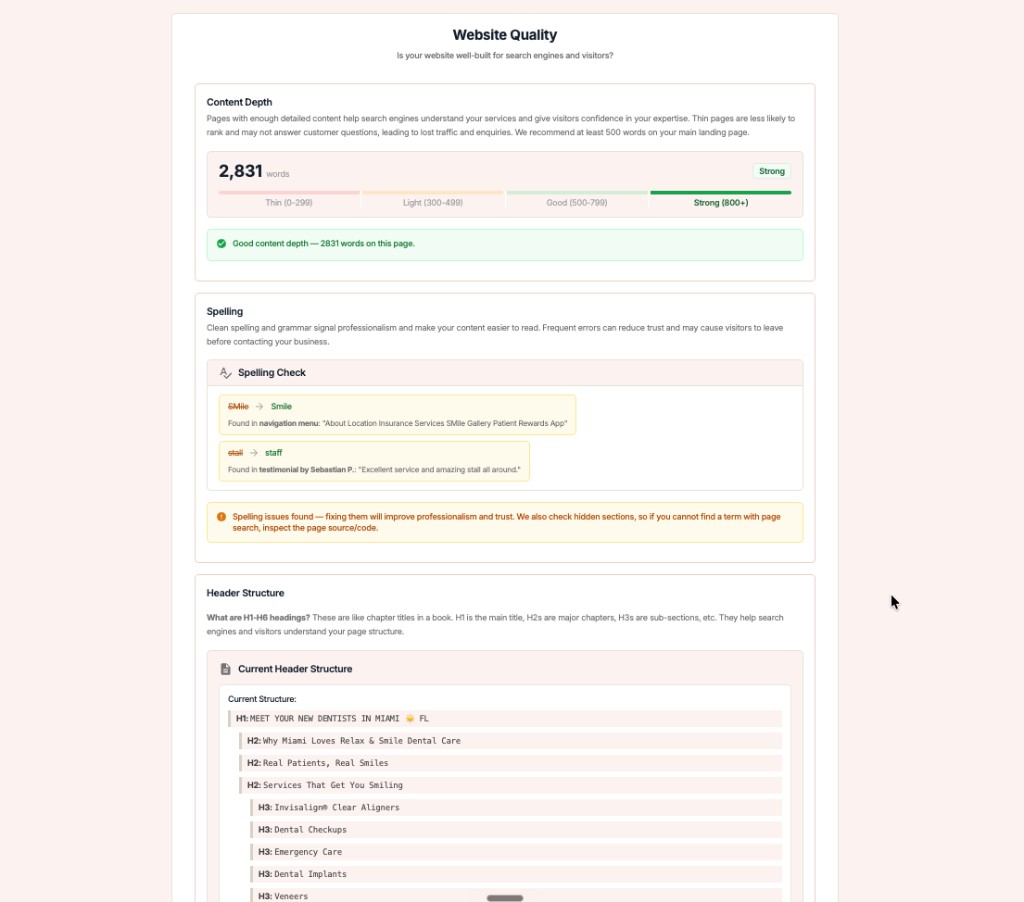
GMB Everywhere Website Audit showing a spelling check that points to the exact flagged word alongside content depth and header structure

Read the flags

Work through each flagged word, correct it on the page, and move to the next.

2

Fix real errors, keep brand names

Some flags are real typos; others are your brand name, a product, or a local place. Fix the genuine errors and leave the intentional ones, double-checking spelling of names and addresses.

How to review the flags

  • Correct genuine spelling errors
  • Keep deliberate brand and product names
  • Verify place and street names are spelled right
  • Re-check after editing the page

Where to find it

Read the page aloud once after fixing. It is the fastest way to catch the awkward wording a spell check misses.

3

Re-check on every update

Make a clean pass part of every publish. New content is where fresh typos appear, so re-run the check whenever you update a page.

Fix

Spelling sits alongside content depth and header structure in the Website Quality half of the audit.

Run a Spelling Check with GMB Everywhere

1

Run the audit

Open your business and run the Website Audit with GMB Everywhere.

2

Read the spelling check

See the exact words flagged so you know what to fix.

3

Correct and re-run

Fix the genuine errors, then run the audit again for a clean pass.

What a Visitor Feels: Careless vs. Polished

Careless copy

  • Visible typos on key pages
  • Misspelled place or service names
  • Quietly erodes visitor trust

Polished copy

  • Clean, correct spelling throughout
  • Place and service names verified
  • Reads as professional and trustworthy

Quick FAQs

Do spelling errors really affect SEO?

Typos rarely sink a page by themselves, but they erode the trust that drives local conversions and weaken overall content quality. Clean copy supports the credibility customers look for.

Will the audit flag my brand name?

It may flag brand names, products, or local place names that are not in a standard dictionary. Review each flag and keep the deliberate ones while fixing genuine errors.

How does the spelling check help?

It points to the exact word it flags, so you can fix the error directly instead of re-reading the whole page trying to find it.

How often should I run it?

Run it whenever you publish or update a page. New content is where fresh typos appear, so a quick pass each time keeps your pages clean.

What else is in the Website Quality check?

Alongside spelling, the audit scores your content depth and lays out your header structure so you can judge the whole page.

Features

Complete suite of professional tools for Google Business Profile management

View Competitor Category

How to use:

Open any business on Google Maps - primary and secondary categories display automatically beside the profile

Features:

  • Always Free to Use
  • Find Primary Category
  • Find All Secondary Categories
  • Direct Link to Category Finder
  • Always Displayed on Google Maps

Local Scan

How to use:

Search for any term on Google Maps - click the Local Scan button to compare all GBPs

Features:

  • Compare Multiple Competitors in One Click
  • Compare Competitors Categories & Services
  • Compare Competitor Reviews Across GBPs
  • Compare Competitor Location Advantage
  • Compare Attributes & Other Data

AI Tools

How to use:

Open any business on Google Maps - click the 'AI' button beside the GBP to use AI features

Features:

  • AI GBP Post Generator
  • AI Review Response Generator
  • AI GBP Description Generator
  • AI Q&A Section Generator
  • AI Facebook Post Generator

Category Finder

How to use:

Open any business on Google Maps - click the 'Find more' button beside categories

Features:

  • Find Related Categories Based on Real Data
  • Get Service Suggestions for Each Category
  • Analyze Traffic Potential per Category
  • Extract Category Suggestions from Website URL
  • Category Suggestions from AI Chat

Basic Audit

How to use:

Open any business on Google Maps - click the 'Basic Audit' button beside the GBP

Features:

  • GBP Info like Place ID, Knowledge ID, CID & More
  • Find Services, Attributes, Categories & More
  • GBP Links like Review Request, Service/Product & More
  • Compare on External Maps Outside Google Maps
  • 40+ Additional Data Points & Tools

Review Audit

How to use:

Open any business on Google Maps - click the 'Review Audit' button beside the GBP

Features:

  • Track Review & Rating Trends Over Time
  • Detailed Review Analysis for GBP
  • Discover Common Keywords in Reviews
  • Custom Review Filtering for Analysis
  • Other Review Features

Teleport

How to use:

Open any business on Google Maps - click the 'Teleport' button beside the GBP

Features:

  • Find GBP Rank at Any Location
  • Find GBP Rank for Any Search Term
  • Find GBP Competitors at Any Location
  • Customizable Location Settings
  • Can Run for Any Location Worldwide

Post Audit

How to use:

Open any business on Google Maps - click the 'Post Audit' button beside the GBP

Features:

  • GBP Posts Timeline Visualization
  • Track Total GBP Posts & Post Frequency
  • Analyze GBP Post Content & Character Count
  • Monitor GBP Posts with Links & Media
  • GBP Post Performance Insights

Loved by Local SEO Experts

Join thousands of agencies and businesses using GMB Everywhere daily

Run a Spelling Check with GMB Everywhere

Join 250,000+ users who use GMB Everywhere to analyze competitors and optimize their Google Business Profiles

Install GMB Everywhere - It’s Free

More GBP Guides