Categories are one of the biggest factors in how your business ranks on Google Maps. If you're only using a primary category and skipping the secondary ones, you could be missing out on searches that are relevant to your business. This guide explains what secondary categories are, how to find them on any profile, and how to pick the right ones.
What Are Google Business Profile Categories?
Categories tell Google what your business does. When someone searches for a specific type of business, Google uses categories to decide which profiles to show. Picking the right categories means your business shows up for the right searches and reaches the right potential customers.
Google updates its list of available categories from time to time, so it's worth checking back every few months to see if new ones apply to your business.
Primary vs. Secondary Categories
Your primary category is the main one. It should describe the core of what your business does. This is the category Google weighs most heavily when deciding where to show your profile.
Secondary categories cover the other things you offer. If you run a bakery that also does catering, "Bakery" might be your primary and "Caterer" a secondary. Adding the right secondary categories helps you show up in more types of searches without confusing Google about what your main business is.
Why Secondary Categories Matter
Secondary categories help customers find you when they search for something specific. For example, if someone searches for "gluten-free bakery" and you've added that as a secondary category, your profile is more likely to show up.
They also help you stand out from competitors who only use a primary category. The more accurately your categories describe what you do, the better chance you have of reaching the right people.
How to Find Secondary Categories on Any Profile
You can see the categories of any Google Business Profile for free using the GMB Everywhere Chrome Extension. Go to gmbeverywhere.com and click Install Chrome Extension.
The GMB Everywhere homepage.
Once installed, go to maps.google.com and search for the business you want to check. You can search by name or address.
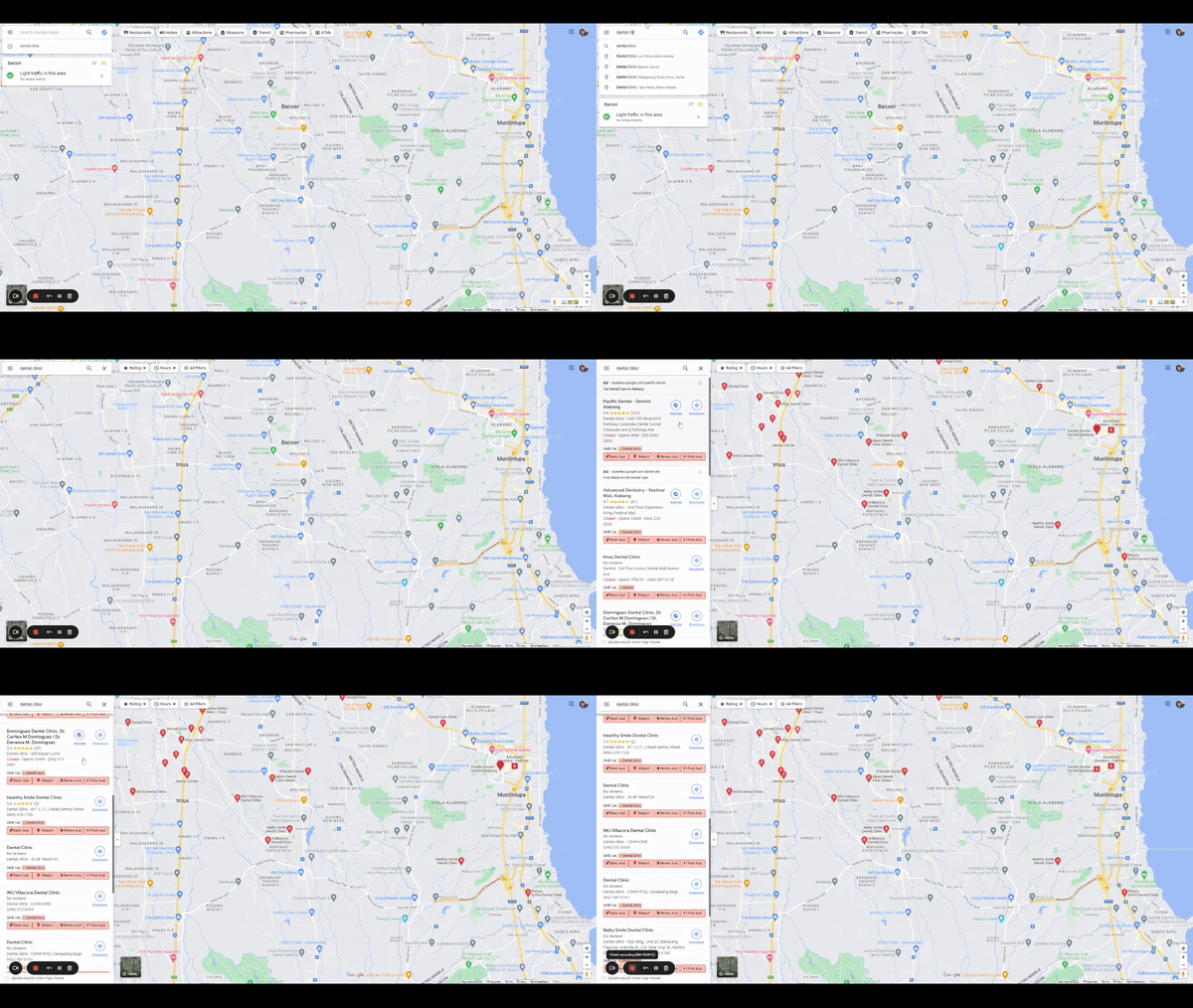
Categories showing up on Google Maps with the extension installed.
With the extension active, you'll see the categories listed right below the business details in the left panel. Look for the GMB Category field.
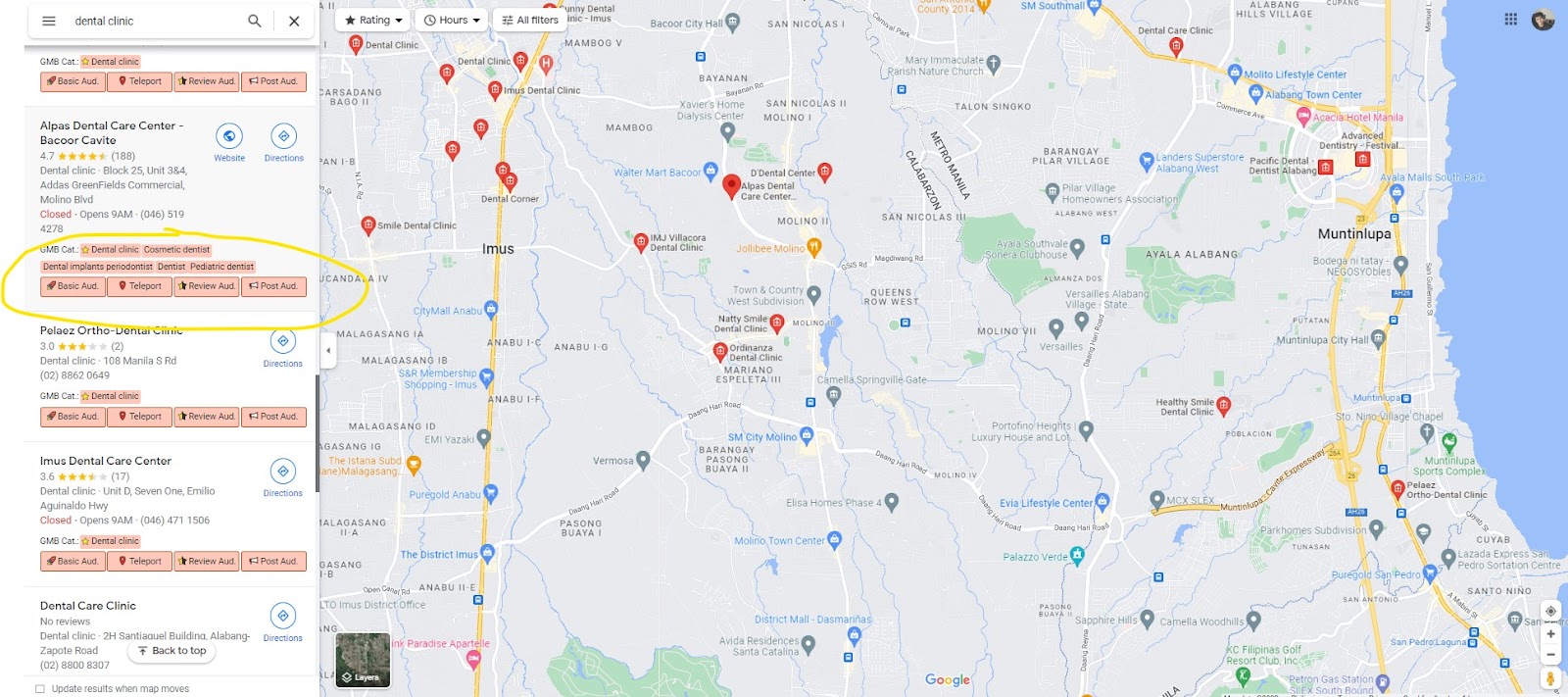
The one with the star is the primary category. The rest are secondary categories.
The primary category is marked with a star. Everything else listed is a secondary category. You can check this on your own profile or any competitor's profile to see what categories they're using.
Tips for Choosing the Right Categories
Getting your categories right is one of the simplest ways to improve your local SEO. Here are some things to keep in mind:
- Pick categories that actually fit: Only choose categories that describe what your business really does. You can select more than one, but every category should be accurate.
- Don't add irrelevant ones: Adding categories just to appear in more searches can backfire. Google can detect this and may penalize your listing or remove it.
- Be specific: Choose "Plumbing Service" over "Home Services." Specific categories help Google match you with the right searches.
- Show what makes you different: If you specialize in something, pick a category for it. A bakery that makes vegan desserts should add "Vegan Bakery" as a category.
- Target your market: If you serve a specific audience, use categories to reflect that. A personal injury law firm should use "Personal Injury Attorney" instead of just "Lawyer."
- Update them when things change: If you add new services or your focus shifts, update your categories to match.
- Swap your primary for seasonal businesses: If your business changes with the seasons, like a bike shop that sells ski gear in winter, change your primary category to match what you're mainly selling at the time.
Conclusion
Secondary categories are a quick way to show up in more relevant searches. Use GMB Everywhere to check what categories your competitors are using, then make sure your own profile reflects everything you offer.
For more tips, check out our guide articles.