Learning how to add your city to your title tag and meta description is one of the simplest local SEO wins, and most sites get it wrong. Your title is the first thing a searcher reads and a clear signal to Google about what you do and where. GMB Everywhere’s Website Audit checks whether your primary category and city actually appear there. Here is how to read the check and fix it without keyword stuffing.
Your title tag and meta description are the first things a searcher reads, and they help Google connect your page to local queries. When your primary category and city are missing, you are leaving the strongest local signal off the most visible line. Google’s own advice on representing your business rewards clarity over cleverness.
This is not about stuffing keywords; it is about saying plainly what you do and where. The Website Audit in GMB Everywhere’s Google Business Profile audit tool checks whether your primary category and city actually appear in your title and meta, and flags the page when they do not.
The audit checks the two lines a searcher sees before they click.
Category
Your primary category
It confirms the service you lead with on your profile appears in your title and meta.
City
Your location
It checks that your city shows up so Google can tie the page to local searches.
Plain words
Natural phrasing
The aim is a readable title, not a list of keywords jammed together.
Read the check, rewrite the two lines, then confirm.
Run the Website Audit and open GBP & Website Match. The audit reports whether your primary category and city are present in your page title tag and meta description.
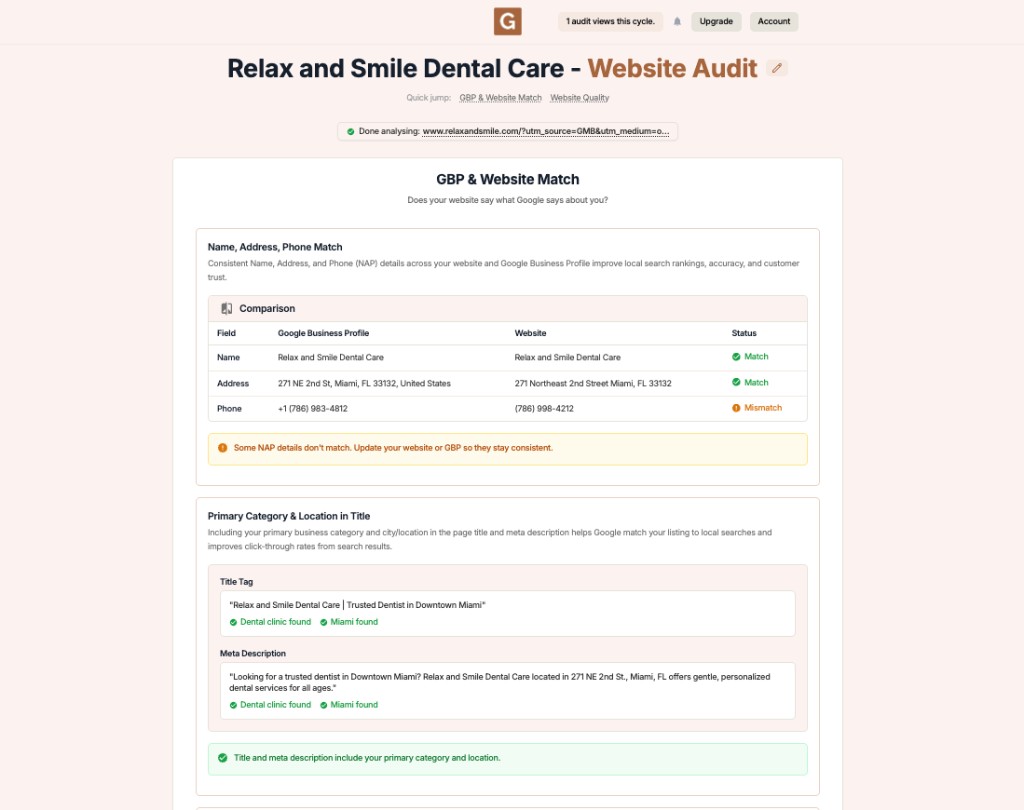
Fix
If the check is missing either piece, your title or meta does not name your main service or your city in a way the audit can see.
Rewrite the title and description so they read naturally while including your category and city. Lead with the service, place the city near it, and keep it human.
Weak title
Clear title
Keep the title concise so it does not truncate in search, and let the meta description add the supporting detail. Then re-run the audit to confirm both checks pass.
Fix
Pair this with strong on-page wording from the local keywords check so the body backs up what the title promises.
See whether your primary category and city appear in both lines.
Update the title and description, then run the audit again to confirm.
Vague title and meta
Clear title and meta
Where exactly should the city go?
Put your city in the title near your main service, and again in the meta description. One natural mention in each is enough; you do not need to repeat it.
Will adding a city help me rank locally?
Naming your city and service clearly helps Google understand the page is relevant to local searches. It is one signal among many, paired with consistent details across your site and profile.
How long should my title tag be?
Keep it concise so it does not get cut off in search results. Lead with the most important words, your service and city, and let the meta description carry the rest.
Is keyword stuffing a problem?
Yes. Repeating the same terms reads poorly and can work against you. Write a clear, human title that names your service and city once.
What if I have several locations?
Give each location its own page with its own title and city, the same way you give core services their own category pages.
Complete suite of professional tools for Google Business Profile management
How to use:
Open any business on Google Maps - primary and secondary categories display automatically beside the profile
Features:
How to use:
Search for any term on Google Maps - click the Local Scan button to compare all GBPs
Features:
How to use:
Open any business on Google Maps - click the 'AI' button beside the GBP to use AI features
Features:
How to use:
Open any business on Google Maps - click the 'Find more' button beside categories
Features:
How to use:
Open any business on Google Maps - click the 'Basic Audit' button beside the GBP
Features:
How to use:
Open any business on Google Maps - click the 'Review Audit' button beside the GBP
Features:
How to use:
Open any business on Google Maps - click the 'Teleport' button beside the GBP
Features:
How to use:
Open any business on Google Maps - click the 'Post Audit' button beside the GBP
Features:
Join thousands of agencies and businesses using GMB Everywhere daily
Join 250,000+ users who use GMB Everywhere to analyze competitors and optimize their Google Business Profiles
Install GMB Everywhere - It’s FreeFebruary 20, 2026
GuidesFebruary 20, 2026