Local SEO

Is Your Business Phone Number Clickable on Mobile?

The quickest way to check whether your business phone number is clickable on mobile is to run a Website Audit. GMB Everywhere’s Mobile Click-to-Call check flags whether your number is a tap-to-call link, and its NAP check confirms it matches your Google Business Profile. Mobile visitors expect to tap and call, so if the audit shows it is not clickable, you add one small tel: link. Here is how to check and fix it.

Audit Your GBP for Free
Free to Start 250,000+ Users

June 12, 2026

What the Audit Checks for Your Phone Number

A mobile visitor who wants to call should be able to tap your number, and the number they tap has to be the same one on your Google Business Profile. The Website Audit checks both: its Mobile Click-to-Call check flags whether your number is tappable, and the NAP check confirms it matches. Google’s guidance on accurate contact info stresses getting the number right everywhere.

If the audit shows your number is not clickable, the fix is quick: wrap it in a tel: link. GMB Everywhere’s Google Business Profile audit tool shows you the result; this guide shows you how to add the link.

What the Audit Flags vs. What You Fix

The audit detects whether your number is clickable and matching; if it is not, the fix is a one-line edit.

Audit

Click-to-call check

The Mobile Click-to-Call check flags whether your number is wrapped in a tap-to-call tel: link.

Audit

Number match

The NAP check confirms the number on your site matches your profile, character for character.

Fix

Add the tel: link

If it is not clickable, wrap the number in a tel: link so mobile users can tap to call.

Check It, Then Make It Tappable

First check the Mobile Click-to-Call result, then add the tel: link if it is missing.

1

Check the Mobile Click-to-Call result

Run the Website Audit and find the Mobile Click-to-Call check. It tells you whether your number is wrapped in a tap-to-call tel: link so visitors can dial straight from your site.
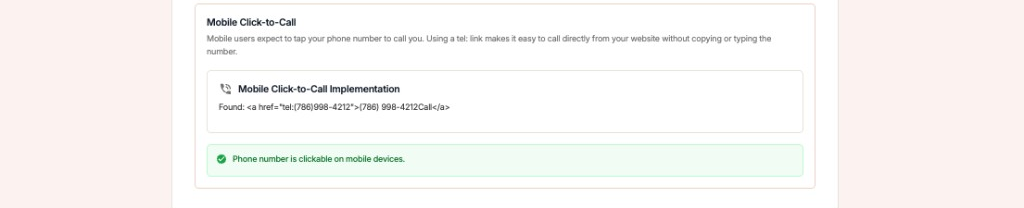
GMB Everywhere Website Audit Mobile Click-to-Call check confirming the phone number is clickable on mobile devices

If it is not clickable

When the check shows your number is not tappable, move to the next step and add a tel: link.

2

Add a tel: link for mobile

If the check flagged your number as not clickable, make it tappable. A tel: link turns your number into a tap-to-call button. The audit flags whether this link exists; adding it is a quick manual edit on your site.

Not tappable

  • <span>(512) 555-0148</span> — plain text, not tappable
  • Number shown only inside an image
  • Different number than the profile

Tap to call

  • <a href="tel:+15125550148">(512) 555-0148</a>
  • Real text wrapped in a tel: link
  • Same number as the profile, character for character
3

Place it where callers look

Use your full number in international format inside the link, and show the friendly format as the visible text. Place it in the header and footer so it is always within reach.

Fix

For the rest of your contact details, the NAP match check confirms your name and address line up too.

Confirm the Number with GMB Everywhere

1

Run the audit

Use GMB Everywhere to see whether your number is clickable and matches your profile.

2

Add the tel: link

Wrap your visible number in a tel: link so mobile users can tap to call.

3

Test on a phone

Open your site on a phone, tap the number, and confirm it dials correctly.

What a Caller Gets: Hard vs. Easy

Hard to call

  • Number does not match the profile
  • Plain text that cannot be tapped
  • Buried in an image or the footer only

Easy to call

  • Number matches the profile exactly
  • Wrapped in a tel: link for one-tap calling
  • Visible in the header and footer

Quick FAQs

Does the Website Audit check if my number is clickable?

Yes. The Mobile Click-to-Call check flags whether your number is wrapped in a tap-to-call tel: link. If it is not, adding the link is a quick manual edit you make on your site.

How do I make a phone number clickable?

Wrap it in a tel: link, for example a link to tel:+15125550148, and show the friendly format as the visible text. On mobile, tapping it starts a call.

What format should the tel: link use?

Use the full number in international format inside the link, including the country code. Keep the visible text in the format your customers recognize.

Why does the matching number matter so much?

A consistent phone number is part of your NAP, a core trust signal for local search. The NAP match check confirms it lines up with your name and address.

Where should the click-to-call number go?

Put it in your site header and footer, and near any call to action. The easier it is to find, the more likely a mobile visitor is to call.

Features

Complete suite of professional tools for Google Business Profile management

View Competitor Category

How to use:

Open any business on Google Maps - primary and secondary categories display automatically beside the profile

Features:

  • Always Free to Use
  • Find Primary Category
  • Find All Secondary Categories
  • Direct Link to Category Finder
  • Always Displayed on Google Maps

Local Scan

How to use:

Search for any term on Google Maps - click the Local Scan button to compare all GBPs

Features:

  • Compare Multiple Competitors in One Click
  • Compare Competitors Categories & Services
  • Compare Competitor Reviews Across GBPs
  • Compare Competitor Location Advantage
  • Compare Attributes & Other Data

AI Tools

How to use:

Open any business on Google Maps - click the 'AI' button beside the GBP to use AI features

Features:

  • AI GBP Post Generator
  • AI Review Response Generator
  • AI GBP Description Generator
  • AI Q&A Section Generator
  • AI Facebook Post Generator

Category Finder

How to use:

Open any business on Google Maps - click the 'Find more' button beside categories

Features:

  • Find Related Categories Based on Real Data
  • Get Service Suggestions for Each Category
  • Analyze Traffic Potential per Category
  • Extract Category Suggestions from Website URL
  • Category Suggestions from AI Chat

Basic Audit

How to use:

Open any business on Google Maps - click the 'Basic Audit' button beside the GBP

Features:

  • GBP Info like Place ID, Knowledge ID, CID & More
  • Find Services, Attributes, Categories & More
  • GBP Links like Review Request, Service/Product & More
  • Compare on External Maps Outside Google Maps
  • 40+ Additional Data Points & Tools

Review Audit

How to use:

Open any business on Google Maps - click the 'Review Audit' button beside the GBP

Features:

  • Track Review & Rating Trends Over Time
  • Detailed Review Analysis for GBP
  • Discover Common Keywords in Reviews
  • Custom Review Filtering for Analysis
  • Other Review Features

Teleport

How to use:

Open any business on Google Maps - click the 'Teleport' button beside the GBP

Features:

  • Find GBP Rank at Any Location
  • Find GBP Rank for Any Search Term
  • Find GBP Competitors at Any Location
  • Customizable Location Settings
  • Can Run for Any Location Worldwide

Post Audit

How to use:

Open any business on Google Maps - click the 'Post Audit' button beside the GBP

Features:

  • GBP Posts Timeline Visualization
  • Track Total GBP Posts & Post Frequency
  • Analyze GBP Post Content & Character Count
  • Monitor GBP Posts with Links & Media
  • GBP Post Performance Insights

Loved by Local SEO Experts

Join thousands of agencies and businesses using GMB Everywhere daily

Confirm Your Phone Number with GMB Everywhere

Join 250,000+ users who use GMB Everywhere to analyze competitors and optimize their Google Business Profiles

Install GMB Everywhere - It’s Free

More GBP Guides