Local SEO

How Much Content Does a Local Landing Page Need to Rank?

If you have wondered how many words a local landing page should have to rank, the better question is whether the page has enough genuine depth to help a customer decide. Thin pages give Google and readers little to work with, while useful, sufficient content competes. GMB Everywhere’s Website Audit scores your content depth against simple bands. Here is how to read it and build pages that earn their ranking.

Audit Your GBP for Free
Free to Start 250,000+ Users

June 12, 2026

Why Thin Local Pages Struggle to Rank

There is no magic word count for a local landing page, but a page that is too thin gives Google and customers little to work with. Enough genuine content to explain your service, answer real questions, and show you serve the area is what helps a page compete. Google’s SEO starter guide puts useful, sufficient content at the center.

Rather than chase a number, aim for depth that actually helps the reader. The Website Audit in GMB Everywhere’s Google Business Profile audit tool scores your content depth against simple bands, so you can see at a glance whether a page is too light.

How the Content Depth Check Works

The audit gives you a quick read on whether a page has enough substance.

Depth

Word-count bands

It scores your content against simple bands so you can tell thin from sufficient at a glance.

Signal

A starting point

The band is a prompt to add real value where a page is light, not a target to pad toward.

Quality

Useful over long

Depth should answer questions and describe your service, not stretch with filler.

Give Each Page Enough to Rank

Read the band, add genuine depth, then confirm the page is no longer thin.

1

Read the content depth band

Run the Website Audit and open Website Quality. The content depth meter scores your page against bands so you can see whether it sits in the thin range.
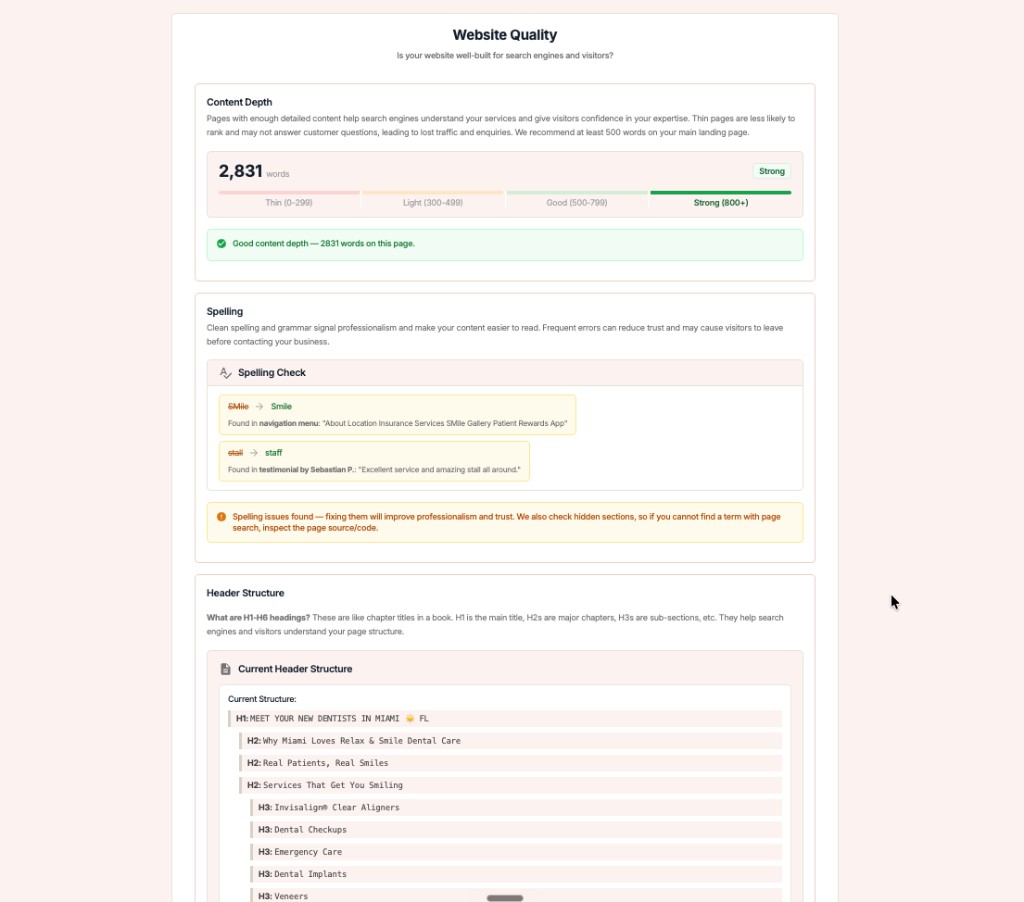
GMB Everywhere Website Audit showing a content depth score with word-count bands, a spelling check, and header structure

Read the band

A page in the thin band is your cue to add substance, starting with the questions customers actually ask.

2

Add depth that helps the reader

Add depth that earns its place. The strongest local pages explain the service, who it helps, your service area, pricing context, and the questions people ask before they call.

What real depth includes

  • A clear description of the service
  • Your service area and who it is for
  • Answers to common customer questions
  • Proof points like process or guarantees

Where to find it

Write for the customer first. If a section helps someone decide to call, it belongs; if it only adds words, cut it.

3

Re-run and refine

Re-run the audit after you expand a page. Use the band as a floor to clear, then keep editing for clarity rather than padding past it.

Fix

Pair depth with a clean outline using the header structure check so longer pages stay easy to scan.

Measure Content Depth with GMB Everywhere

1

Run the audit

Open your business and run the Website Audit with GMB Everywhere.

2

Check content depth

See which band your page lands in and whether it reads as thin.

3

Expand and re-run

Add useful content, then run the audit again to confirm the improvement.

What Google Sees: Thin vs. Developed

Thin landing page

  • A few lines and a phone number
  • No answers to common questions
  • Reads as a placeholder

Well-developed page

  • Service, area, and audience explained
  • Real answers to customer questions
  • Reads as a genuine resource

Quick FAQs

How many words should a local landing page have?

There is no fixed number. Aim for enough genuine content to explain your service, answer common questions, and show you serve the area. The audit’s bands help you tell thin from sufficient.

Is longer always better?

No. Padding a page with filler does not help. Depth should add value for the reader; once the page answers real questions clearly, more words for their own sake do not help.

What should I add to a thin page?

Start with the questions customers ask before they call: what the service includes, who it is for, your service area, and what to expect. That depth is the most useful.

Does content depth affect ranking?

Useful, sufficient content helps a page compete, while very thin pages give Google little to work with. It is one factor alongside consistency and relevance.

How does this relate to the rest of the audit?

Content depth is part of Website Quality, alongside the spelling check and header structure. Strong pages do well on all three.

Features

Complete suite of professional tools for Google Business Profile management

View Competitor Category

How to use:

Open any business on Google Maps - primary and secondary categories display automatically beside the profile

Features:

  • Always Free to Use
  • Find Primary Category
  • Find All Secondary Categories
  • Direct Link to Category Finder
  • Always Displayed on Google Maps

Local Scan

How to use:

Search for any term on Google Maps - click the Local Scan button to compare all GBPs

Features:

  • Compare Multiple Competitors in One Click
  • Compare Competitors Categories & Services
  • Compare Competitor Reviews Across GBPs
  • Compare Competitor Location Advantage
  • Compare Attributes & Other Data

AI Tools

How to use:

Open any business on Google Maps - click the 'AI' button beside the GBP to use AI features

Features:

  • AI GBP Post Generator
  • AI Review Response Generator
  • AI GBP Description Generator
  • AI Q&A Section Generator
  • AI Facebook Post Generator

Category Finder

How to use:

Open any business on Google Maps - click the 'Find more' button beside categories

Features:

  • Find Related Categories Based on Real Data
  • Get Service Suggestions for Each Category
  • Analyze Traffic Potential per Category
  • Extract Category Suggestions from Website URL
  • Category Suggestions from AI Chat

Basic Audit

How to use:

Open any business on Google Maps - click the 'Basic Audit' button beside the GBP

Features:

  • GBP Info like Place ID, Knowledge ID, CID & More
  • Find Services, Attributes, Categories & More
  • GBP Links like Review Request, Service/Product & More
  • Compare on External Maps Outside Google Maps
  • 40+ Additional Data Points & Tools

Review Audit

How to use:

Open any business on Google Maps - click the 'Review Audit' button beside the GBP

Features:

  • Track Review & Rating Trends Over Time
  • Detailed Review Analysis for GBP
  • Discover Common Keywords in Reviews
  • Custom Review Filtering for Analysis
  • Other Review Features

Teleport

How to use:

Open any business on Google Maps - click the 'Teleport' button beside the GBP

Features:

  • Find GBP Rank at Any Location
  • Find GBP Rank for Any Search Term
  • Find GBP Competitors at Any Location
  • Customizable Location Settings
  • Can Run for Any Location Worldwide

Post Audit

How to use:

Open any business on Google Maps - click the 'Post Audit' button beside the GBP

Features:

  • GBP Posts Timeline Visualization
  • Track Total GBP Posts & Post Frequency
  • Analyze GBP Post Content & Character Count
  • Monitor GBP Posts with Links & Media
  • GBP Post Performance Insights

Loved by Local SEO Experts

Join thousands of agencies and businesses using GMB Everywhere daily

Check Content Depth with GMB Everywhere

Join 250,000+ users who use GMB Everywhere to analyze competitors and optimize their Google Business Profiles

Install GMB Everywhere - It’s Free

More GBP Guides