The quickest way to make Instagram Story images for a local business is to open the GBP Image Generator and choose Instagram Story / Reel. That makes a tall picture for Stories and Reels, with story ideas like a flash sale or a new service.
A Google Post picture leaves empty bands on a Story. Choose Instagram Story / Reel Vertical · 9:16 for Stories and Reel covers. The tool does not create a 16:9 YouTube or cover size.
Keep the sale or service real. Google’s photo guidelines still matter if you later reuse a frame on the Business Profile. For a matching feed post, make a second square picture instead of stretching this one. You can also share a GBP post when the caption should stay in sync.
Ideas like a flash sale, a new arrival, or a before-and-after. After you pick a business, you usually see 3 suggestions instead.
Sale
Flash sale countdown announcement
Use only if the sale is real and the end date is true.
New
New arrival or new service spotlight
Good for a service you just started offering.
Proof
Before-and-after showcase
Only use this if both the before and after are real photos you own. Do not generate a fake after result.
Here’s how to use it.
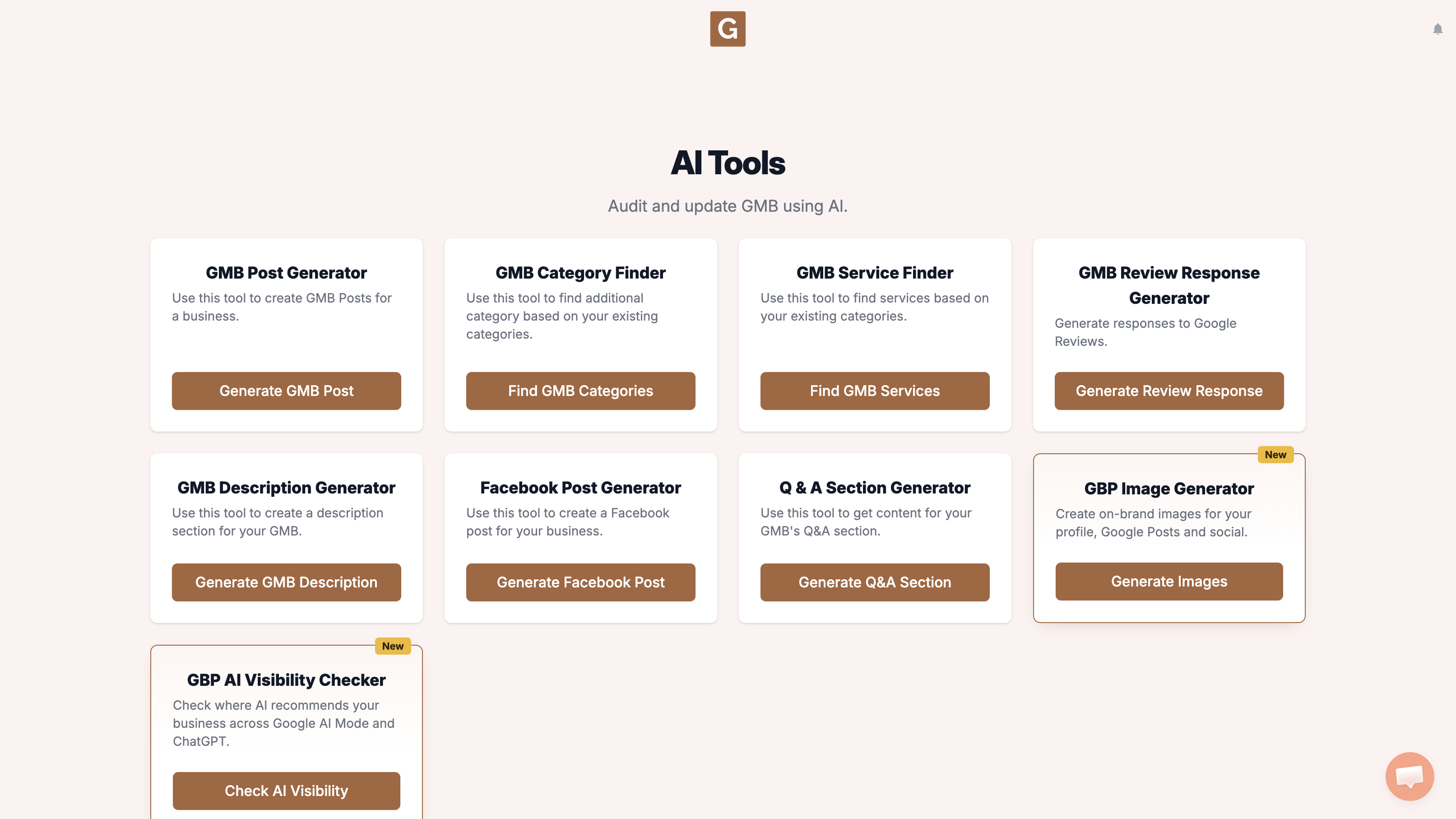
Open GMB Everywhere AI Tools and find the card titled GBP Image Generator. It says it creates on-brand images for your profile, Google Posts and social. Click Generate Images.
You’ll land on GBP Image Generator. Under Find your business, start typing your business name and pick the listing. Under Where will you use it? choose Instagram Story / Reel (Vertical · 9:16). The four options are GBP Post (Landscape · 4:3), Profile Photo (Square · 1:1), Facebook / Instagram Post (Square · 1:1), and Instagram Story / Reel (Vertical · 9:16). There is no 16:9 option.
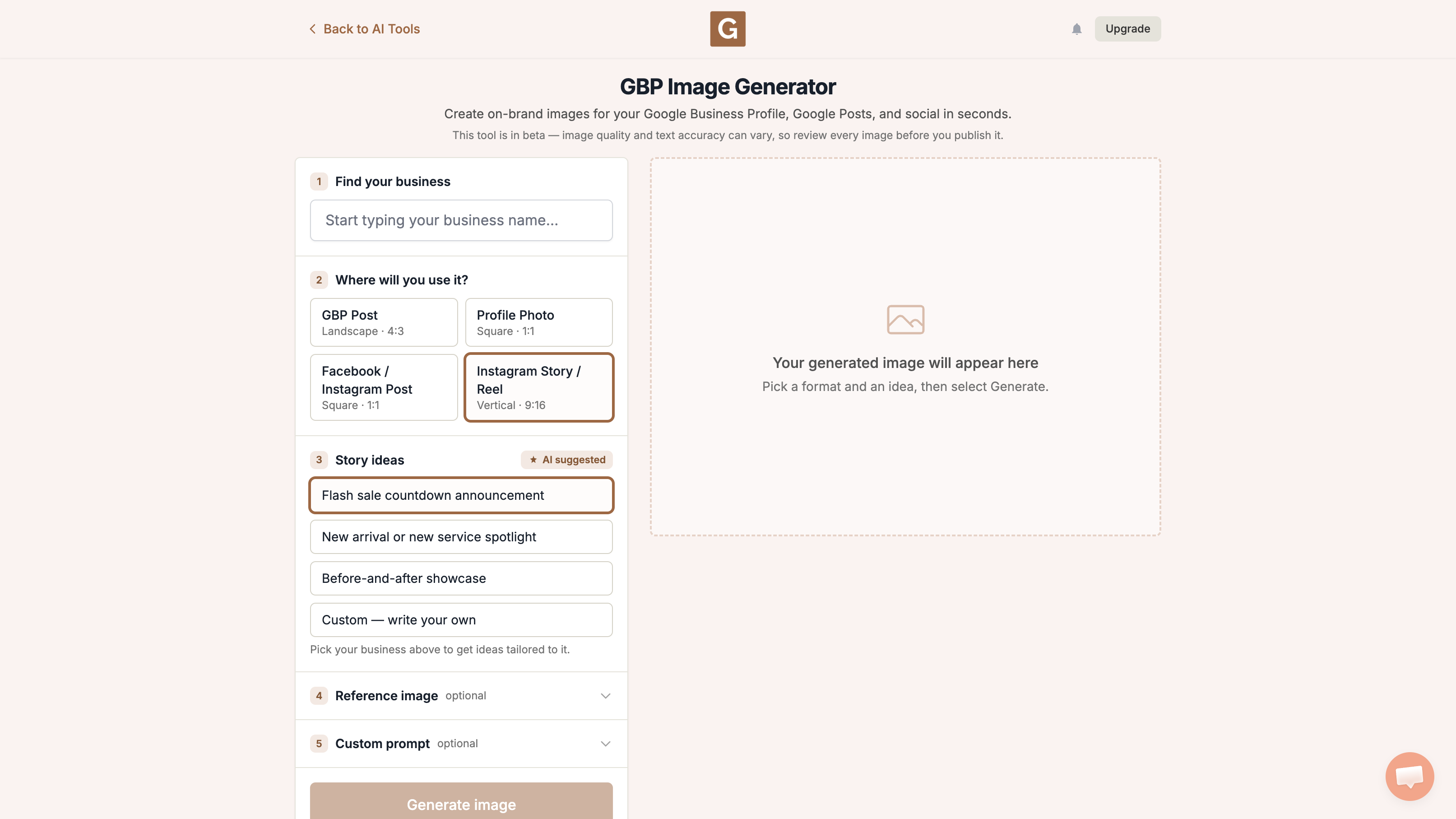
After you pick a business, that list becomes 3 ideas suggested for the listing. Pick the one closest to what you need, or choose Custom — write your own. The names below are examples of the defaults, not a promise you will see those exact lines. A reference image and the optional Custom prompt are separate fields. Then click Generate image.
What the tool does not do
It does not upload the image to Google Business Profile, Instagram, or Facebook. Download it, take a look, then add it yourself. Keep the picture honest, and do not invent a shop, team, or offer you do not have.
A feed post is a different option, so make a second square picture instead of stretching this Story. If you want the caption to travel with a GBP post, use the share GBP post guide after the image is live.
What people try first
What actually helps
Does this post the Story?
No. You download the image and add it in Instagram.
Is this also for Reels?
The card is labeled Instagram Story / Reel. It is a tall cover-style image, not a video editor.
Does this upload to Instagram?
No. Download the tall image, then add it to your Story yourself.
Complete suite of professional tools for Google Business Profile management
How to use:
Open any business on Google Maps - primary and secondary categories display automatically beside the profile
Features:
How to use:
Search for any term on Google Maps - click the Local Scan button to compare all GBPs
Features:
How to use:
Open any business on Google Maps - click the 'AI' button beside the GBP to use AI features
Features:
How to use:
Open any business on Google Maps - click the 'Find more' button beside categories
Features:
How to use:
Open any business on Google Maps - click the 'Basic Audit' button beside the GBP
Features:
How to use:
Open any business on Google Maps - click the 'Review Audit' button beside the GBP
Features:
How to use:
Open any business on Google Maps - click the 'Teleport' button beside the GBP
Features:
How to use:
Open any business on Google Maps - click the 'Post Audit' button beside the GBP
Features:
How to use:
Open any business on Google Maps - click the 'Website Audit' button beside the GBP
Features:
Join thousands of agencies and businesses using GMB Everywhere daily
Join 250,000+ users who use GMB Everywhere to analyze competitors and optimize their Google Business Profiles
Install GMB Everywhere - It’s FreeSeptember 22, 2026
GuidesSeptember 22, 2026