Local SEO

Header Structure for Local Pages: Getting H1–H6 Right for Local SEO

Getting your H1 to H6 header structure right for SEO gives a local page a clean outline that readers and Google can both follow. One H1 names the page, and H2s and H3s nest beneath it without skipping levels. GMB Everywhere’s Website Audit lays out your header structure so you can spot extra H1s and skipped levels fast. Here is how to read it and fix your hierarchy.

Audit Your GBP for Free
Free to Start 250,000+ Users

June 12, 2026

Why Header Structure Matters for Local Pages

Headers give your page an outline that both readers and Google follow. A clean hierarchy, one H1 that names the page, then H2s and H3s that nest under it, makes a local page easy to scan and easy to understand. Google’s SEO starter guide treats clear headings as part of well-structured content.

Many local pages either skip an H1 or jump levels, which muddies the outline. The Website Audit in GMB Everywhere’s Google Business Profile audit tool lays out your header structure from H1 to H6 so you can confirm a clean hierarchy at a glance.

What the Header Structure View Shows

The audit turns your headings into a simple outline you can check.

Outline

H1 to H6 at a glance

It lists your headings in order so you can see the page’s structure the way Google reads it.

One H1

A single page title

It helps you confirm there is exactly one H1 that names what the page is about.

No skips

Levels in order

A clean hierarchy moves H1 to H2 to H3 without jumping a level for styling.

Get Your H1 to H6 in Order

Read the outline, fix the levels, then write headings that mean something.

1

Read the header structure view

Run the Website Audit and open Website Quality. The header structure view lists your headings from H1 to H6 in the order they appear on the page.
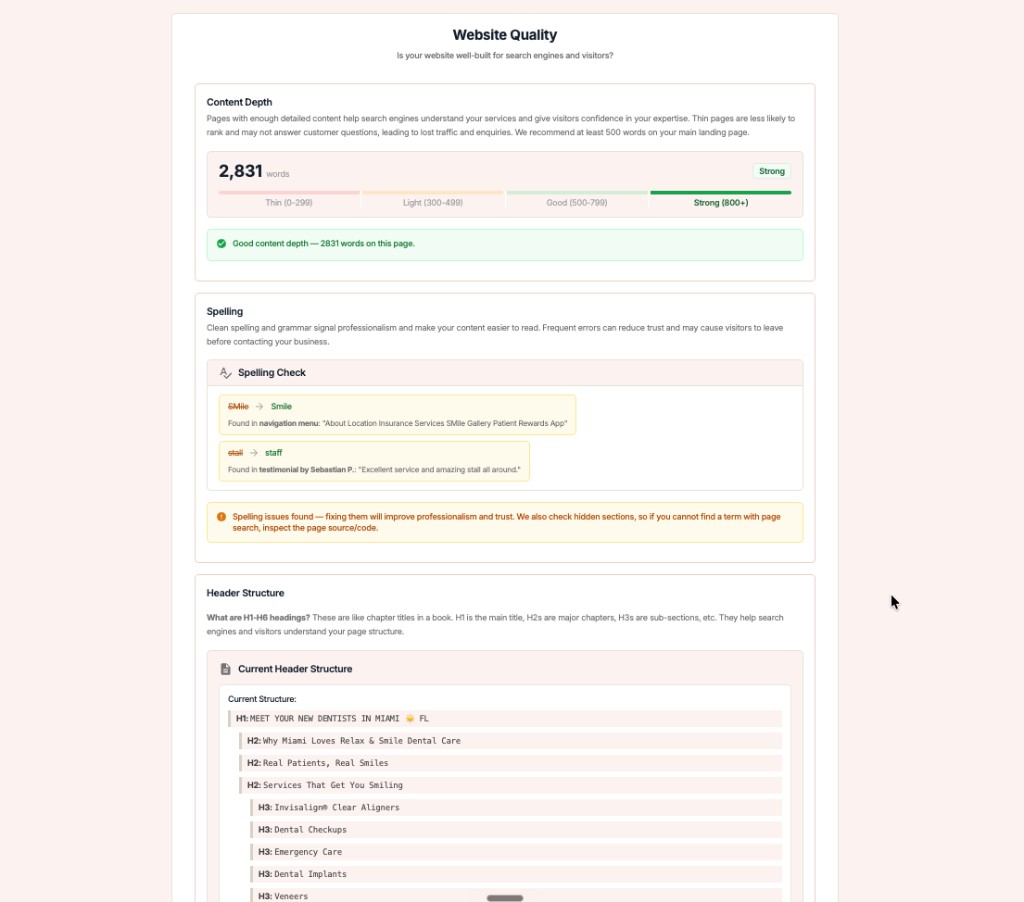
GMB Everywhere Website Audit showing the header structure from H1 to H6 alongside content depth and a spelling check

Read the outline

Scan for two problems: more than one H1, and any place where the levels jump, such as an H2 straight to an H4.

2

Fix the hierarchy

Fix the hierarchy so it reads like a clean outline. One H1 names the page, H2s mark the main sections, and H3s sit under their H2.

Messy hierarchy

  • Two or more H1s on the page
  • H2 jumps straight to H4
  • Headings chosen for size, not meaning

Clean hierarchy

  • Exactly one H1 that names the page
  • H1 to H2 to H3 with no skipped levels
  • Headings chosen for structure, styled with CSS
3

Write headings with meaning

Use your H1 to state the page’s purpose, and let your H2s mirror the questions a customer would ask. Style with CSS, not by picking a bigger heading tag.

Fix

A clean outline pairs with real substance; check the content depth band so each section has something to say.

Check Your Headers with GMB Everywhere

1

Run the audit

Open your business and run the Website Audit with GMB Everywhere.

2

Check the outline

Read the H1 to H6 view and look for extra H1s or skipped levels.

3

Fix and re-run

Correct the hierarchy, then run the audit again to confirm a clean outline.

What Google Sees: Disordered vs. Structured

Disordered headings

  • Several H1s or none at all
  • Levels skipped for visual size
  • Hard to scan the outline

Structured headings

  • One H1 that names the page
  • H1 to H2 to H3 in order
  • Easy to scan and understand

Quick FAQs

How many H1 tags should a page have?

One. A single H1 names what the page is about. Use H2s and H3s for the sections beneath it rather than adding more H1s.

Can I skip from H2 to H4?

It is better not to. Move through levels in order, H2 to H3 to H4, so the outline stays clear. If you want smaller text, style the heading with CSS instead of skipping a level.

Do headings affect SEO?

Clear, well-ordered headings help Google understand your page and help readers scan it. They are part of well-structured content rather than a standalone ranking trick.

Should my city go in a heading?

Where it fits naturally, yes. Local terms in headings carry weight, which is exactly what the local keywords check looks for.

What does the audit show for headers?

It lists your headings from H1 to H6 in order, so you can confirm there is one H1 and that the levels nest without skips.

Features

Complete suite of professional tools for Google Business Profile management

View Competitor Category

How to use:

Open any business on Google Maps - primary and secondary categories display automatically beside the profile

Features:

  • Always Free to Use
  • Find Primary Category
  • Find All Secondary Categories
  • Direct Link to Category Finder
  • Always Displayed on Google Maps

Local Scan

How to use:

Search for any term on Google Maps - click the Local Scan button to compare all GBPs

Features:

  • Compare Multiple Competitors in One Click
  • Compare Competitors Categories & Services
  • Compare Competitor Reviews Across GBPs
  • Compare Competitor Location Advantage
  • Compare Attributes & Other Data

AI Tools

How to use:

Open any business on Google Maps - click the 'AI' button beside the GBP to use AI features

Features:

  • AI GBP Post Generator
  • AI Review Response Generator
  • AI GBP Description Generator
  • AI Q&A Section Generator
  • AI Facebook Post Generator

Category Finder

How to use:

Open any business on Google Maps - click the 'Find more' button beside categories

Features:

  • Find Related Categories Based on Real Data
  • Get Service Suggestions for Each Category
  • Analyze Traffic Potential per Category
  • Extract Category Suggestions from Website URL
  • Category Suggestions from AI Chat

Basic Audit

How to use:

Open any business on Google Maps - click the 'Basic Audit' button beside the GBP

Features:

  • GBP Info like Place ID, Knowledge ID, CID & More
  • Find Services, Attributes, Categories & More
  • GBP Links like Review Request, Service/Product & More
  • Compare on External Maps Outside Google Maps
  • 40+ Additional Data Points & Tools

Review Audit

How to use:

Open any business on Google Maps - click the 'Review Audit' button beside the GBP

Features:

  • Track Review & Rating Trends Over Time
  • Detailed Review Analysis for GBP
  • Discover Common Keywords in Reviews
  • Custom Review Filtering for Analysis
  • Other Review Features

Teleport

How to use:

Open any business on Google Maps - click the 'Teleport' button beside the GBP

Features:

  • Find GBP Rank at Any Location
  • Find GBP Rank for Any Search Term
  • Find GBP Competitors at Any Location
  • Customizable Location Settings
  • Can Run for Any Location Worldwide

Post Audit

How to use:

Open any business on Google Maps - click the 'Post Audit' button beside the GBP

Features:

  • GBP Posts Timeline Visualization
  • Track Total GBP Posts & Post Frequency
  • Analyze GBP Post Content & Character Count
  • Monitor GBP Posts with Links & Media
  • GBP Post Performance Insights

Loved by Local SEO Experts

Join thousands of agencies and businesses using GMB Everywhere daily

Audit Your Header Structure with GMB Everywhere

Join 250,000+ users who use GMB Everywhere to analyze competitors and optimize their Google Business Profiles

Install GMB Everywhere - It’s Free

More GBP Guides