You can use AI images on Google Business Profile posts if they still look like your real business. Google asks that photos represent reality, with no excessive AI. The GBP Image Generator makes the picture, and you look at it before you publish.
Google’s photo guidelines say a photo should be in focus, well lit, and have no significant alterations or excessive use of filters or AI. In other words, the image should represent reality. The Image Generator footer repeats that you must not misrepresent your business.
That is why you should look at the picture first. Make the GBP Post image, read the text on it, and skip anything that invents a room, team, or offer you do not have. Pair the image with honest post copy from the GMB post AI tool.
Use AI for layout and type. Do not use it to fake the business.
Safer
Graphic offer cards
A simple announcement layout is closer to a designed post than a fake interior.
Riskier
Fake rooms or staff
A generated clinic or kitchen that is not yours can fail the represent-reality rule.
Required
You look first
Quality and text can vary, so read the picture before you upload it.
Here’s how to use it.
Open GMB Everywhere AI Tools and find the card titled GBP Image Generator. It says it creates on-brand images for your profile, Google Posts and social. Click Generate Images.
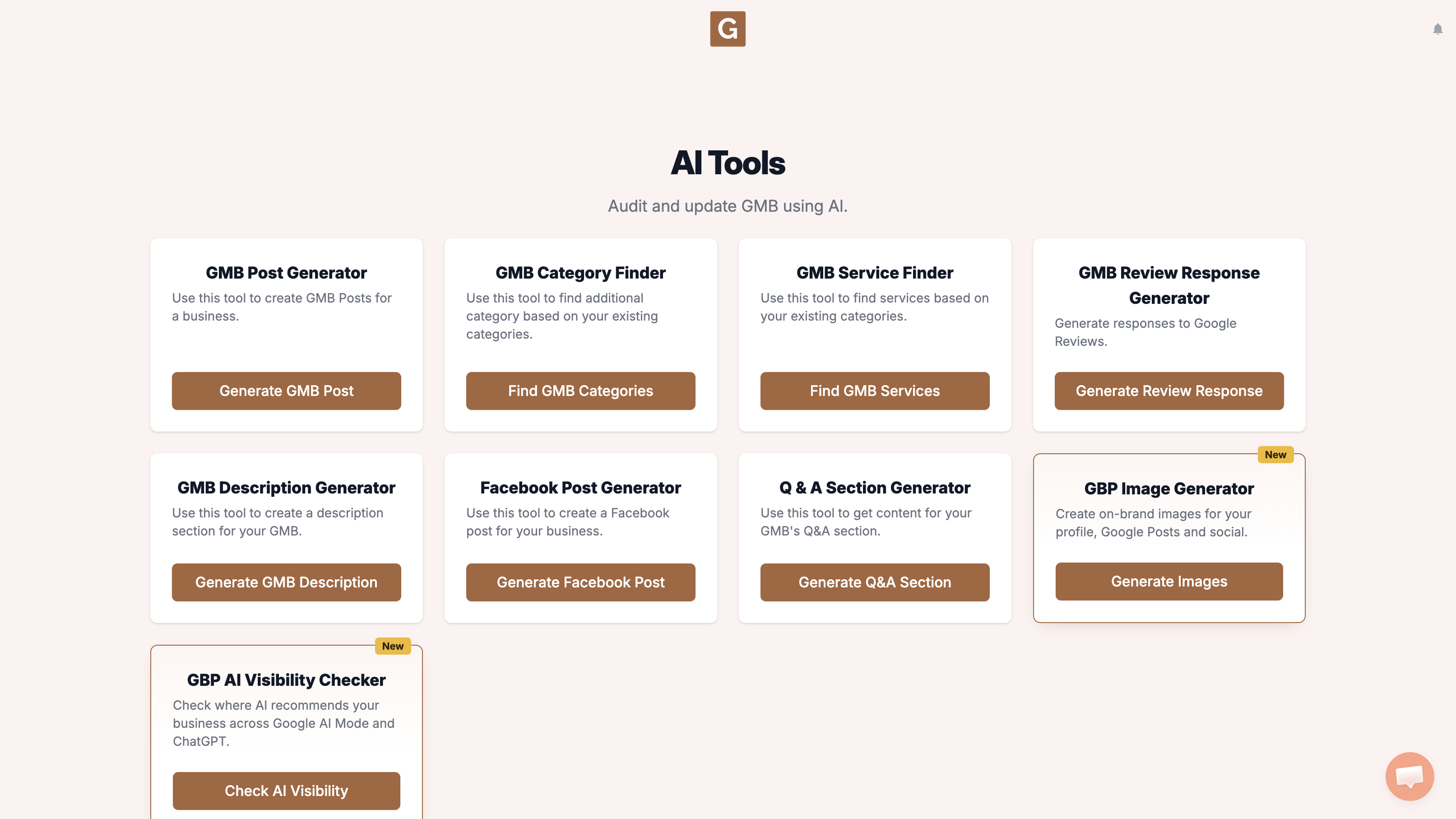
You’ll land on GBP Image Generator. Under Find your business, start typing your business name and pick the listing. Under Where will you use it? choose GBP Post (Landscape · 4:3). The four options are GBP Post (Landscape · 4:3), Profile Photo (Square · 1:1), Facebook / Instagram Post (Square · 1:1), and Instagram Story / Reel (Vertical · 9:16). There is no 16:9 option.
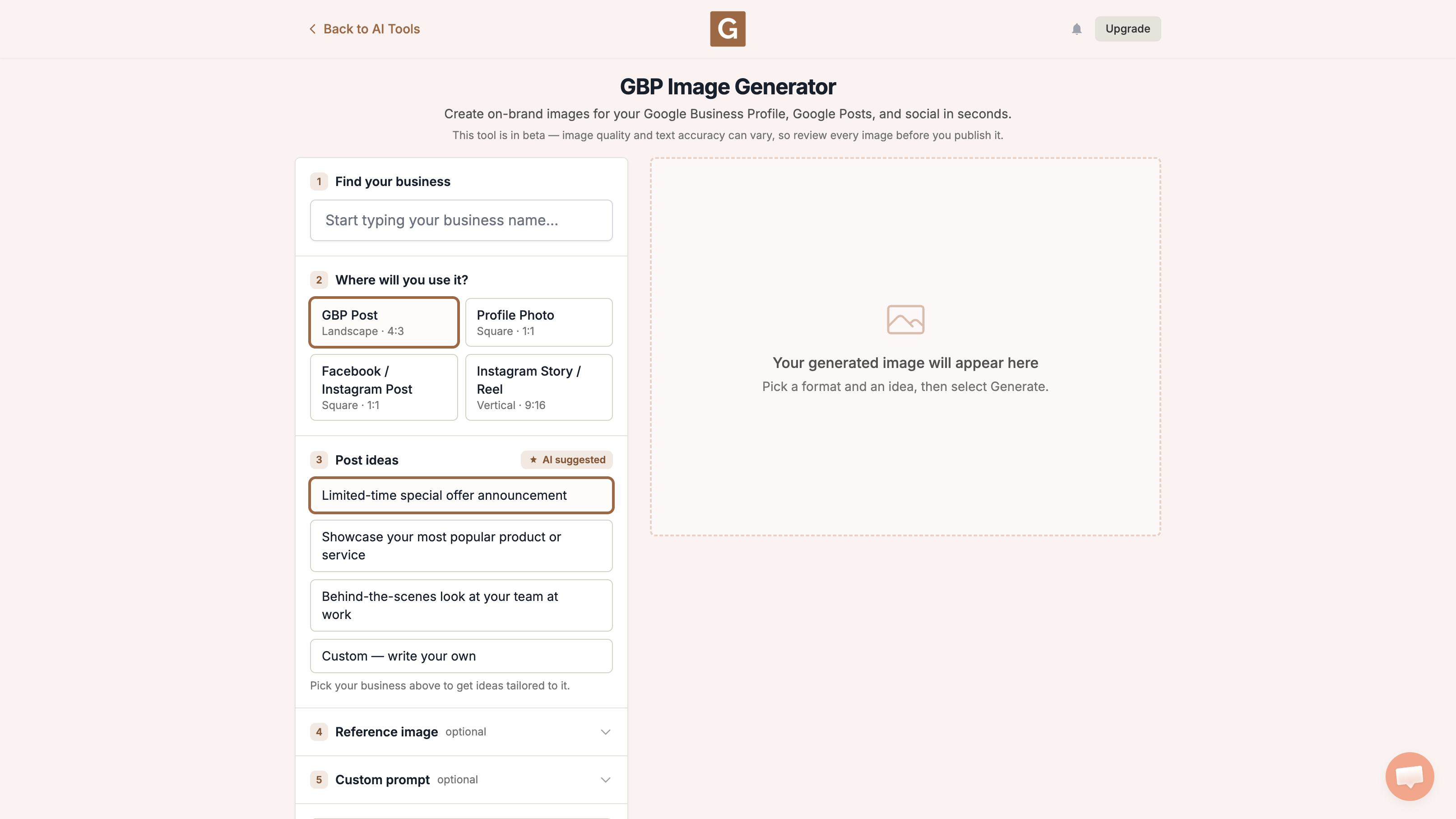
After you pick a business, that list becomes 3 ideas suggested for the listing. Pick the one closest to what you need, or choose Custom — write your own. The names below are examples of the defaults, not a promise you will see those exact lines. A reference image and the optional Custom prompt are separate fields. Then click Generate image.
What the tool does not do
It does not upload the image to Google Business Profile, Instagram, or Facebook. Download it, take a look, then add it yourself. Keep the picture honest, and do not invent a shop, team, or offer you do not have.
If you are making a regular post, make a GBP Post picture and write the caption with the GMB post AI tool. Google’s photo guidelines are the rule to read before anything goes live.
What people try first
What actually helps
Are AI images banned on GBP?
AI images are not banned outright. Google asks that photos represent reality and avoid excessive AI.
Does the tool upload for me?
No. You download the picture and decide what goes live.
Where is the policy?
Read Google’s photo guidelines and photo policy.
Complete suite of professional tools for Google Business Profile management
How to use:
Open any business on Google Maps - primary and secondary categories display automatically beside the profile
Features:
How to use:
Search for any term on Google Maps - click the Local Scan button to compare all GBPs
Features:
How to use:
Open any business on Google Maps - click the 'AI' button beside the GBP to use AI features
Features:
How to use:
Open any business on Google Maps - click the 'Find more' button beside categories
Features:
How to use:
Open any business on Google Maps - click the 'Basic Audit' button beside the GBP
Features:
How to use:
Open any business on Google Maps - click the 'Review Audit' button beside the GBP
Features:
How to use:
Open any business on Google Maps - click the 'Teleport' button beside the GBP
Features:
How to use:
Open any business on Google Maps - click the 'Post Audit' button beside the GBP
Features:
How to use:
Open any business on Google Maps - click the 'Website Audit' button beside the GBP
Features:
Join thousands of agencies and businesses using GMB Everywhere daily
Join 250,000+ users who use GMB Everywhere to analyze competitors and optimize their Google Business Profiles
Install GMB Everywhere - It’s FreeSeptember 22, 2026
GuidesSeptember 22, 2026