AI Visibility

How to Appear in Google AI Mode as a Local Business

The quickest way to see if you appear in Google AI Mode is to run the GBP AI Visibility Checker. Keep your Google Business Profile current as well, because Google still asks for an up-to-date listing.

Check Google AI Mode
Free to Start 250,000+ Users

September 22, 2026

What Google says about appearing in AI Mode

Google Search Central says there are no extra requirements beyond being indexed and following normal SEO practice. Keep Business Profile information up to date. Indexing is not guaranteed, and AI Mode answers can still omit you.

Pick your listing, run visibility search, and read the Google AI Mode result next to ChatGPT. If you also work in Chrome with Google’s assistant, Gemini in Chrome for local SEO is a separate path from this checker.

What to prepare before you check AI Mode

Do the Search basics first, then measure.

Index

The site can be shown in Search

Google says a page must be eligible for Search with a snippet before it can support AI features.

Profile

GBP details are current

Hours, categories, and contact facts should match what you tell customers.

Check

Run Google AI Mode in the tool

The checker queries AI Mode automatically with ChatGPT so you see the local mention, not just a Maps pin.

How to Use the GBP AI Visibility Checker

Here’s how to use it.

1

Open GBP AI Visibility Checker

Open GMB Everywhere AI Tools and find the card titled GBP AI Visibility Checker. It says it checks where AI recommends your business across Google AI Mode and ChatGPT. Click Check AI Visibility.
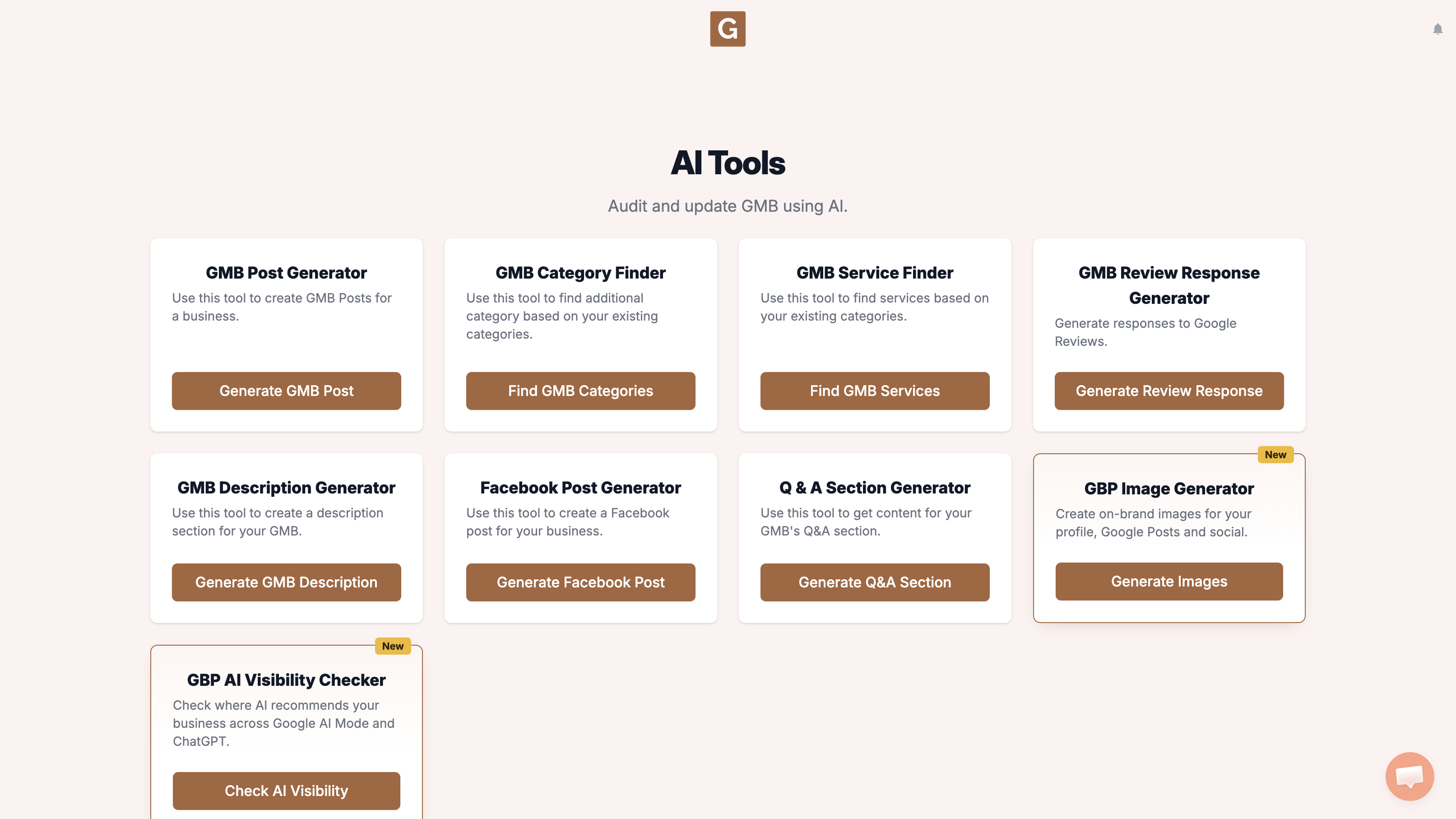
GMB Everywhere AI Tools page showing the GBP AI Visibility Checker card and the Check AI Visibility button
2

Pick your business

Type your business name and click the right listing. There is no topic field. The tool chooses the search topic when you click Run visibility search.
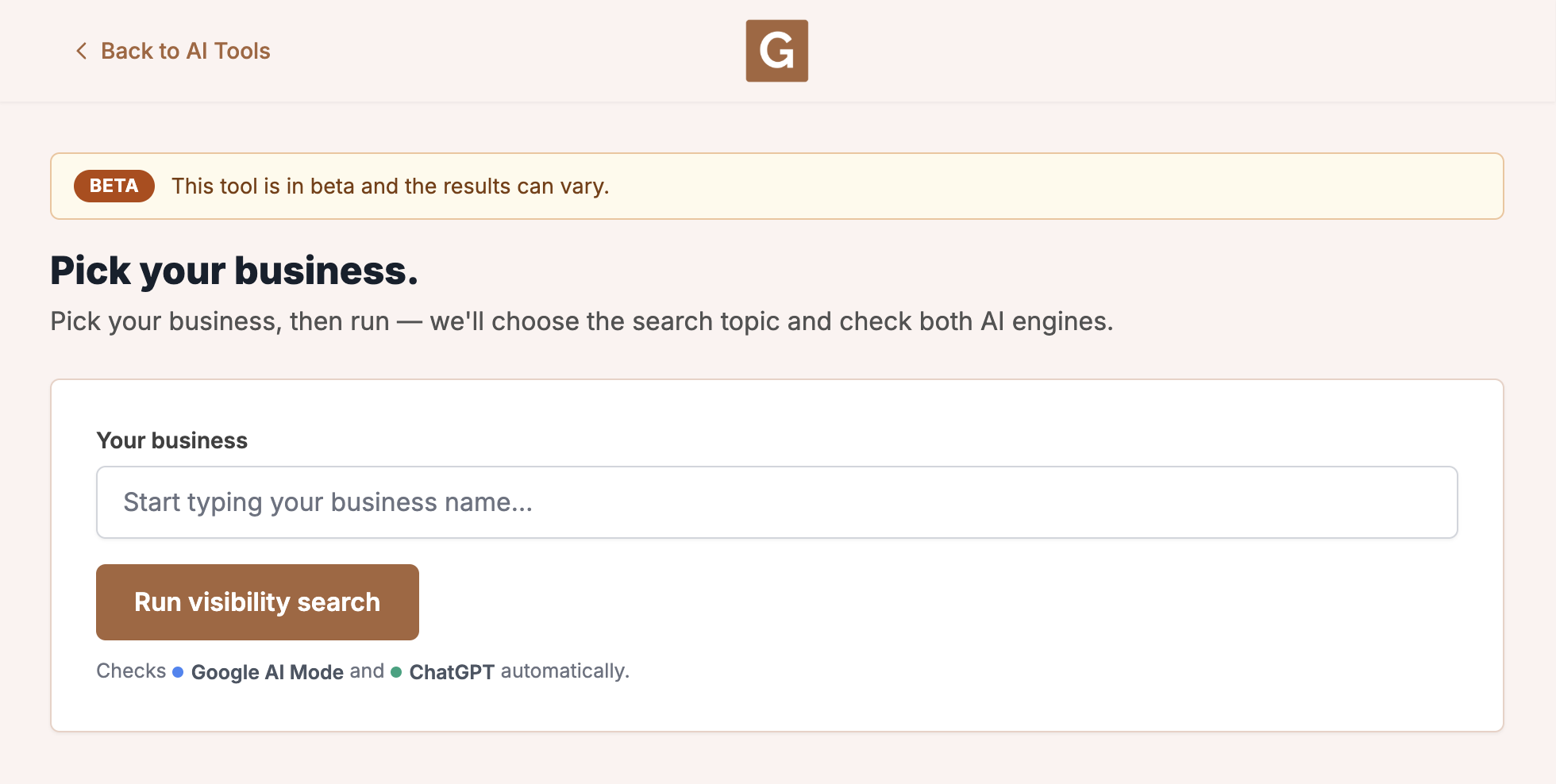
GBP AI Visibility Checker with Your business and Run visibility search. The tool chooses the topic when you run.
3

Run visibility search

Click Run visibility search. The tool chooses the topic, then checks Google AI Mode and ChatGPT. Stay on the page until it finishes. The report shows that topic as Searched for.

What you’re looking at

This run checks Google AI Mode and ChatGPT. It is not your Maps rank, and it does not check AI Overviews, Gemini, or other chat tools.

What to do next

A complete profile still helps. A Google Business Profile audit can show you what Maps visitors still see, and a website NAP check is useful when the site and listing disagree.

What not to do, and what to do instead

What people try first

  • Waiting for AI Mode without checking
  • Editing the site for AI Overviews only
  • Using a different business name on the website

What actually helps

  • Follow Google’s usual SEO guidance
  • Keep the Business Profile current
  • Run GBP AI Visibility Checker and read the AI Mode result

Quick FAQs

Does the tool check AI Overviews?

No. It only checks Google AI Mode and ChatGPT.

Do I need special schema?

Google says you do not need special schema.org markup for AI features.

Will a Maps rank guarantee AI Mode?

No. Rank and AI Mode mentions are different outcomes.

Features

Complete suite of professional tools for Google Business Profile management

View Competitor Category

How to use:

Open any business on Google Maps - primary and secondary categories display automatically beside the profile

Features:

  • Always Free to Use
  • Find Primary Category
  • Find All Secondary Categories
  • Direct Link to Category Finder
  • Always Displayed on Google Maps

Local Scan

How to use:

Search for any term on Google Maps - click the Local Scan button to compare all GBPs

Features:

  • Compare Multiple Competitors in One Click
  • Compare Competitors Categories & Services
  • Compare Competitor Reviews Across GBPs
  • Compare Competitor Location Advantage
  • Compare Attributes & Other Data

AI Tools

How to use:

Open any business on Google Maps - click the 'AI' button beside the GBP to use AI features

Features:

  • AI GBP Post Generator
  • AI Review Response Generator
  • AI GBP Description Generator
  • AI Q&A Section Generator
  • AI Facebook Post Generator

Category Finder

How to use:

Open any business on Google Maps - click the 'Find more' button beside categories

Features:

  • Find Related Categories Based on Real Data
  • Get Service Suggestions for Each Category
  • Analyze Traffic Potential per Category
  • Extract Category Suggestions from Website URL
  • Category Suggestions from AI Chat

Basic Audit

How to use:

Open any business on Google Maps - click the 'Basic Audit' button beside the GBP

Features:

  • GBP Info like Place ID, Knowledge ID, CID & More
  • Find Services, Attributes, Categories & More
  • GBP Links like Review Request, Service/Product & More
  • Compare on External Maps Outside Google Maps
  • 40+ Additional Data Points & Tools

Review Audit

How to use:

Open any business on Google Maps - click the 'Review Audit' button beside the GBP

Features:

  • Track Review & Rating Trends Over Time
  • Detailed Review Analysis for GBP
  • Discover Common Keywords in Reviews
  • Custom Review Filtering for Analysis
  • Other Review Features

Teleport

How to use:

Open any business on Google Maps - click the 'Teleport' button beside the GBP

Features:

  • Find GBP Rank at Any Location
  • Find GBP Rank for Any Search Term
  • Find GBP Competitors at Any Location
  • Customizable Location Settings
  • Can Run for Any Location Worldwide

Post Audit

How to use:

Open any business on Google Maps - click the 'Post Audit' button beside the GBP

Features:

  • GBP Posts Timeline Visualization
  • Track Total GBP Posts & Post Frequency
  • Analyze GBP Post Content & Character Count
  • Monitor GBP Posts with Links & Media
  • GBP Post Performance Insights

Website Audit

How to use:

Open any business on Google Maps - click the 'Website Audit' button beside the GBP

Features:

  • Compare NAP against the GBP
  • Check hours, categories, and meta tags
  • Review local keywords and category pages
  • Score content depth, spelling, and headers
  • Check mobile click-to-call

Loved by Local SEO Experts

Join thousands of agencies and businesses using GMB Everywhere daily

Check Your Google AI Mode Visibility

Join 250,000+ users who use GMB Everywhere to analyze competitors and optimize their Google Business Profiles

Install GMB Everywhere - It’s Free

More GBP Guides