In this article, we’ll show you how to spot and report fake competitors on Google Maps. Doing this can improve your keyword rankings and help you capture a bigger share of the market.
How Important Is It to Find and Report Spam GBP Listings?
According to Whitespark’s 2026 Local Search Ranking Factors report, conducting false competition audits ranks among the most impactful actions you can take to improve your local rankings.
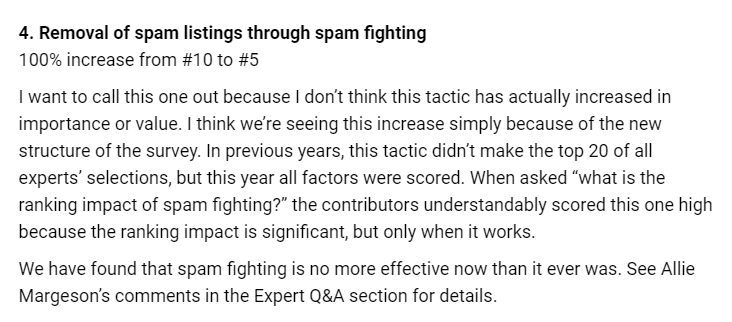
The screenshot above shows how important spam fighting is, as ranked in Whitespark’s Local Search Ranking Factors report.
Google Maps ranking is a zero‑sum game, so finding and dealing with spam listings will allow you to remove unfair competition.
The True Value of False Competition Audits
Before we understand the value of doing a false competition audit, we need to understand how ranks work in Google Maps. Years ago, the best way to gauge your ranks in Google Maps was a keyword report. A keyword report looks like the following:
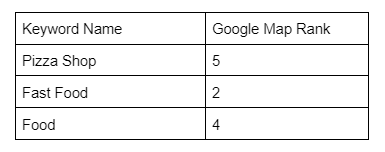
A traditional keyword table with Keyword Name and Map Rank.
This kind of report works for organic search but falls short for Google Maps.
In Google Maps ranking, the proximity of the person relative to the business is a very important ranking factor.
The problem is, in Google Maps, you need to know where you hold these ranks. A keyword report won’t tell you if you’re 2nd in Google Maps for Fast Food within 100 feet of your office, 2 blocks around your office, or for the entire city. You might assume it’s for the entire city, but this is rarely true.
Nowadays, the most common way to find the rank of a business is to use one of the grid scan or other location tools. Two such tools are given below.
Example 1:
Below you can see how a tool like Local Falcon runs a grid scan to show the result. The scan below is a 9 mile by 9 mile area and each node represents 1 mile. We can see while the business ranks 2nd in maps for Fast Food in some places, we don’t everywhere. This grid scan is equivalent to if you drove around your town and ran the same search over and over. The results will slightly change because distance, in correlation to where you’re located, is being factored in.
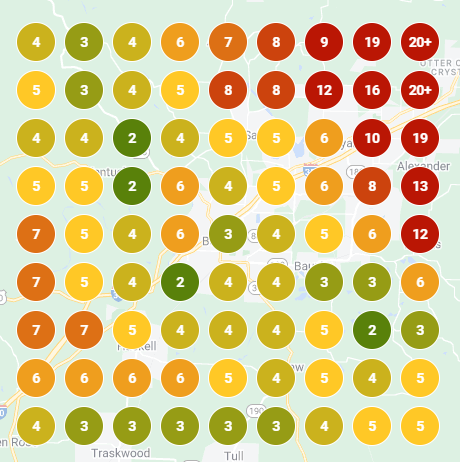
The number inside each circle shows the rank at that particular location.
Example 2:
You can also use a tool like GMB Everywhere’s Teleport functionality, which provides you with a more granular rank at a specific location. See screenshot below.
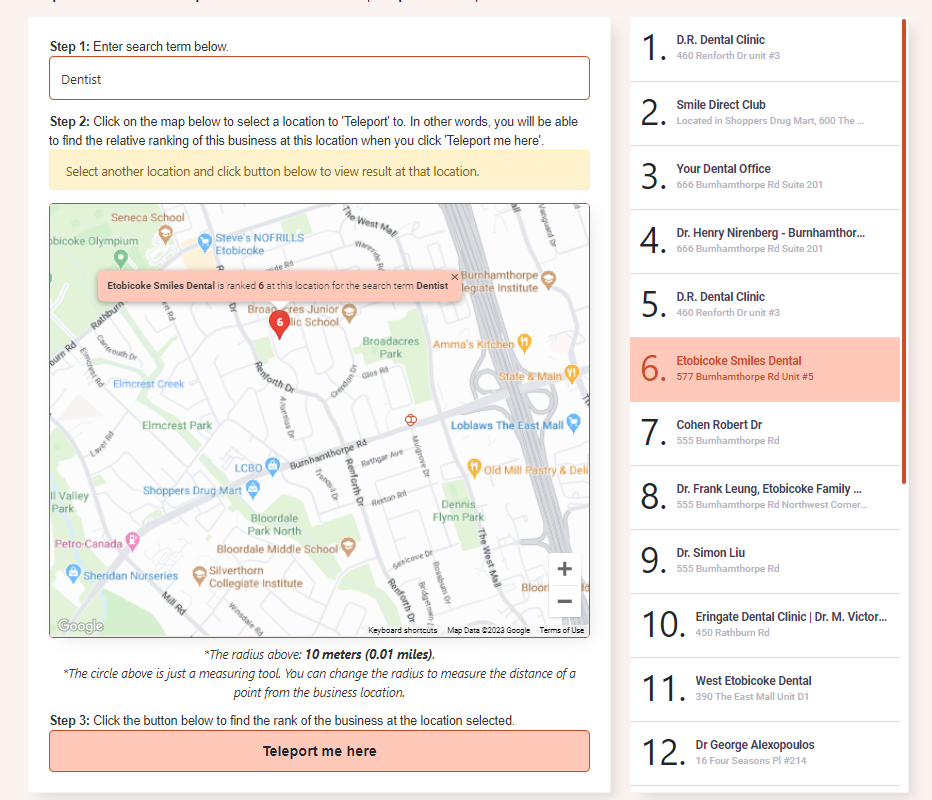
This business ranks 6th for the keyword “Dentist” at that particular location.
Now that we understand the importance of using a grid scan or location ranking tool to see your ranks in Google Maps, let’s dive into how damaging false competition can be. If the top 3 results are the most important positions, it would only take 3 false competing listings in front of your own to prevent you from being in the map pack for any given keyword. For every false competitor removed, you free up market share to instantly obtain. If you were 4th in maps and identified and removed 3 false competitors in front of you, you would now be 1st in maps without any additional marketing efforts. A single false competitor removed means you just gained market share in every combination of keywords that listing ever competed against you for.
Indicators to Identify Spam Listings
Now that we understand the value of false competition audits, let’s discuss indicators to look for when conducting one. We never truly know if a listing is fake, old, or keyword stuffed, but through a list of indicators and pattern recognition, we can make strong assumptions. Based upon these indicators and assumptions, we then make a suggestion to Google to review our report. Google will then agree or disagree with the report.
In other words, you should have a strong intent of being right about your case. But you won’t get in trouble being wrong. With that being said, don’t try to report real businesses. Not only will Google ignore your bad reports, but your trust score will be lowered and eventually Google will ignore your good reports also.
There are three main groups of probably deceptive listing types you should be aware of:
- Fake listings
- Old and unclaimed listings
- Keyword stuffed listings
While the list of indicators below might look long and intimidating, a skilled auditor can look at a listing and in about 30 seconds make a safe determination. Remember, no one indicator is the magic bullet to identify false competition, but using a combination of indicators will help you make quick judgment calls.
“Running false competitions is like playing an endless game of whack a mole. Just because you hit all the moles month one doesn’t mean they won’t come back month two.” — Local Business Protection
Now let’s go through each type of listing and how to identify them:
Fake Listings
These are some indicators:
Instinct
The first important indicator is: what does your gut instinct tell you? Is it normal for a laundromat listing to be in a strip mall? Yes. Is it normal for a nursing home listing to be in a strip mall? No. Odds are you’re right, and this is enough evidence to make a report.
Lack of reviews or unnatural review pattern
Odds are, if the business is legitimate, they’re going to have at least a few reviews. The odds of a business having no reviews but also being legitimate is low enough to make having no reviews an indicator.
On the other hand, sometimes you can see businesses with many reviews that came in a short span of time, or have been reviewed by people who have not reviewed other businesses before.
You can also use the Review Audit tool of GMB Everywhere to identify some of these unnatural reviews. See sample screenshot below.
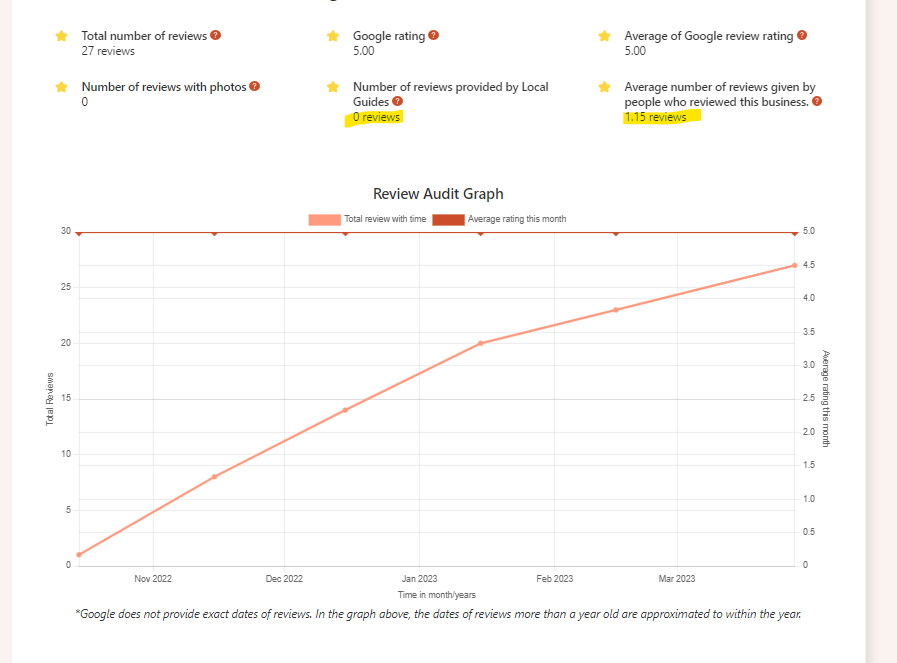
The Review Audit shows reviews by local guides, average reviews given per reviewer, and the review timeline of the business.
As you can see in this result, this business has 0 reviews from local guides and the average number of reviews provided by reviewers for this business is 1.15, which is not natural. The graph also shows they only recently started getting reviews and have been continuously receiving 5‑star reviews every month since around Oct 2022. This does not look natural.
The name of the business is strange
If you saw a law firm called Bob’s Law Firm, we could probably agree the name looks normal. If you saw a listing called “Car Accident Attorney Near Me,” this is less normal and would be considered an indicator to report the listing. Once again, we never truly know — maybe the name is under a DBA — but we can’t tell if a listing is under a DBA, so it’s worth the effort of submitting a report.
Does the listing show a website link? Virtually every business has a website. And if the business doesn’t have a website, they would at least use a social media page in place of one. So the odds of a business not having any website at all becomes an indicator the listing could be fake.
What photos are being used?
Are there any photos at all? At the very least a business is going to have a handful of photos. They will usually relate to their logo or what they do. But the odds of having no photos at all and being a legitimate business is low. Especially when businesses know the value of fully filling out their profile and that anyone in the world can upload images. Odds are, having no images makes it a flag for being a fake listing.
Can you see a trend between different listings and the photos used?
This is an indicator that will be hard to use at first. But the more you study your competition, you might begin to see completely different listings using the same images. You can use this to your advantage as an indicator.
Does it make sense for an address to be showing?
In Google Maps, if an address is being shown, the intent is that anyone can drive to that address and be serviced by that business. If an address is hidden, the intent is that the business will drive to you. So if you see a listing that says it’s a nursing home but is located in an apartment, odds are this is a fake listing.
If it shows an address, can you see signage at the street view level?
In Google Maps, if an address is being shown, the intent is that anyone can drive there and be serviced. But to find that business, Google generally expects signage outside to indicate the business exists there. While there are exceptions — like if your business is in a skyscraper — generally, you would need a sign outside. Looking for signage is also a basic check Google’s own team performs when deciding to take down listings. No signage is a quick way to determine if writing up a listing is worth it.
Is the business in a section of town that makes sense?
It would make sense for a bank to be in a commercial or industrial part of town. While not impossible, it would make less sense for a bank to be in a residential section of town. Trust your gut. If something seems off, it’s worth making the report to Google.
Is the business using a business.site website?
A business.site website is a website you can make through the interface of your Google Maps listing. While using this website isn’t against Google’s guidelines, the odds of a legitimate business using the business.site website as their main website is low. Therefore, using the business.site website can be used as an indicator to report a listing.
Does the website look spammy or cookie cutter?
This indicator can be a little tricky. A low quality website isn’t an indicator on its own. After looking at many websites you can start to tell the difference between a low‑quality website that puts effort behind it and one that looks spammy. Does the content look natural or does the website seem to repeat keywords over and over? Is there any indication of company branding? Any logos? Does the website talk about anyone who works at the company? A company is proud to show off who they are and what they are about. So when a website doesn’t speak about the company behind it or seems to read unnaturally, this is an indicator the website might not have a real company behind it.
How to Uncover Old and Unclaimed Listings
To be frank, old and unclaimed listings are not intentionally deceptive, but they could be remnants of an old business that existed. They could still be taking up ranking space.
Here are some criteria to look for when identifying old and unclaimed listings.
Does the listing say ‘Claim this business’?
This can be used as an indicator that the business is old or unclaimed. With that being said, not every listing that says “Claim This Business” is actually claimable. It’s theorized that Google does this to throw off bots trying to identify claimable listings.
Low review count or lacks any recent reviews
If a business is still around, they would likely have a small trickle of reviews over the course of time. Having only say 3 reviews can be used as an indicator to report the listing as old.
Are there photos being used?
An indicator the business listing is old is if there are no photos at all. At the very least a business will add a logo. So it’s a little strange when there’s not even a logo shown.
Do you see signage at the street view?
A clear indicator the business is old or maybe even fake is a lack of signage or any indication the business exists at the street view level. This is the same check Google representatives take, so it’s a powerful indicator.
Keyword Stuffed Listings
Let’s cover keyword stuffed listings.
What does your gut instinct tell you?
This is probably the fastest and simplest way to identify a keyword stuffed listing. After some practice, you will be shocked how easy it is to do. If the name sounds unnatural, but you see a section of the name that does seem natural, odds are you’re correct and it’s worth making the edit.
Let’s look at a few examples:
Bob’s Law Firm
We can probably agree this is a natural‑sounding business name and nothing seems out of the ordinary here.
Bob’s Law Firm — Personal Injury Car Accident Attorney Near Me
We can probably still agree the “Bob’s Law Firm” part is the real name of the business, but the rest sounds unnatural and is likely keyword stuffing. This can be used as an indicator to make a report to Google.
What is the naming convention of the URL of the website?
If the listing says “Bob’s Law Firm — Personal Injury Car Accident Attorney Near Me” but the website URL says www.bobslawfirm.com, odds are Bob’s Law Firm is the correct name.
What does the title or logo of the website say?
If the listing says “Bob’s Law Firm — Personal Injury Car Accident Attorney Near Me” but the title or logo of the website says Bob’s Law Firm, odds are Bob’s Law Firm is the correct name.
What does the copyright section in the footer say?
If the listing says “Bob’s Law Firm — Personal Injury Car Accident Attorney Near Me” but the copyright section in the footer says Bob’s Law Firm, odds are Bob’s Law Firm is the correct name. Similarly you can check the Privacy Policy and Terms and Conditions documents.
What does the contact us page say?
If the listing says “Bob’s Law Firm — Personal Injury Car Accident Attorney Near Me” but the contact us page says Bob’s Law Firm, odds are Bob’s Law Firm is the correct name.
What images are being used on the website?
It’s not uncommon for images to reveal the true name of a business. If the listing says “Bob’s Law Firm — Personal Injury Car Accident Attorney Near Me” but images on the website use “Bob’s Law Firm,” odds are “Bob’s Law Firm” is the correct name.
Once again, no one indicator is the magic bullet to identify false competition. But using a combination of indicators will help you make quick judgment calls.
How to Audit to Identify False Competition and Take Action
In this section, we will cover how to conduct a false competition audit at a basic level, at an intermediate level, and finally, at a very advanced level. The basic level anyone can do — it is completely free but only works for a handful of listings once in a while. The intermediate level will require a tool that can run grid scans and takes a considerable amount of time. The advanced level is a done‑for‑you solution that combines a grid scan tool, automated tracking, and a manual auditing team to complete the audits monthly.
Let’s begin.
“False Competition is damaging to local businesses but can be hard to identify without the proper tools.” — Local Business Protection
Conducting a False Competition Audit — Basic Level
On a basic level, you would run through the list of indicators, and once you make a judgment call, you will make a suggest edit. Go to the listing in question and you should see a button called “Suggest an edit.”
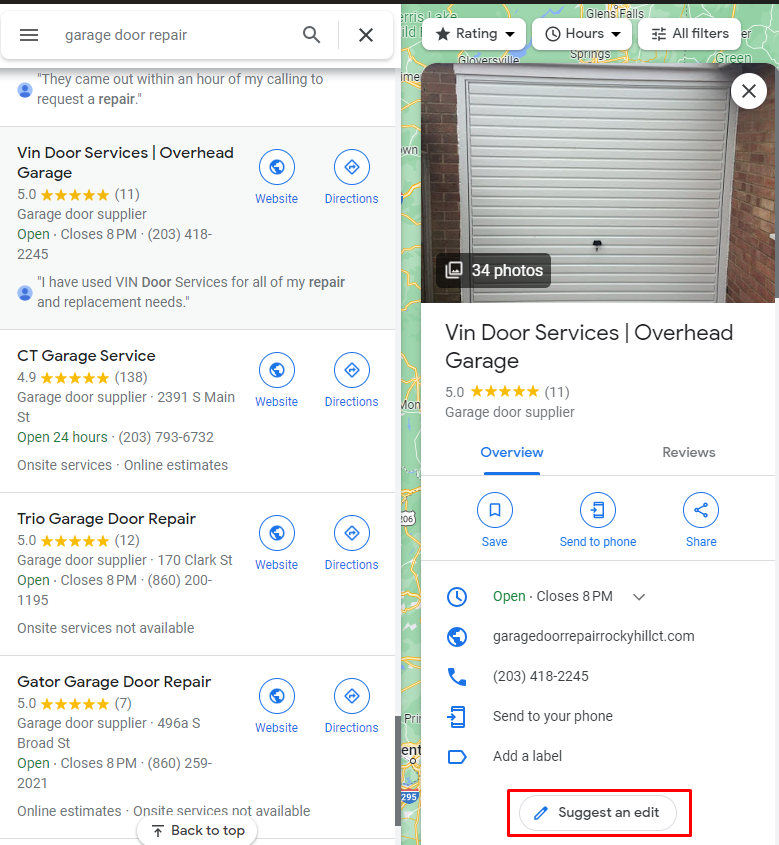
The “Suggest an edit” button on Google Maps.
You should now see two options.
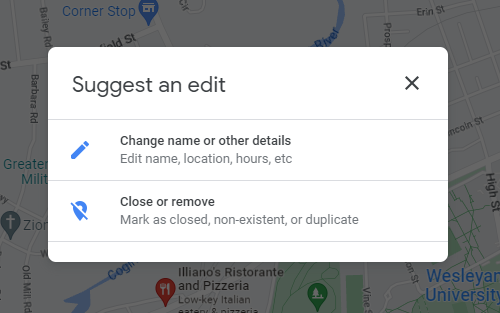
The two options shown when editing a business on Google Maps.
If you’re reporting a keyword stuffed listing, click Change name or other details. Change the name to what you believe is correct, and press submit.
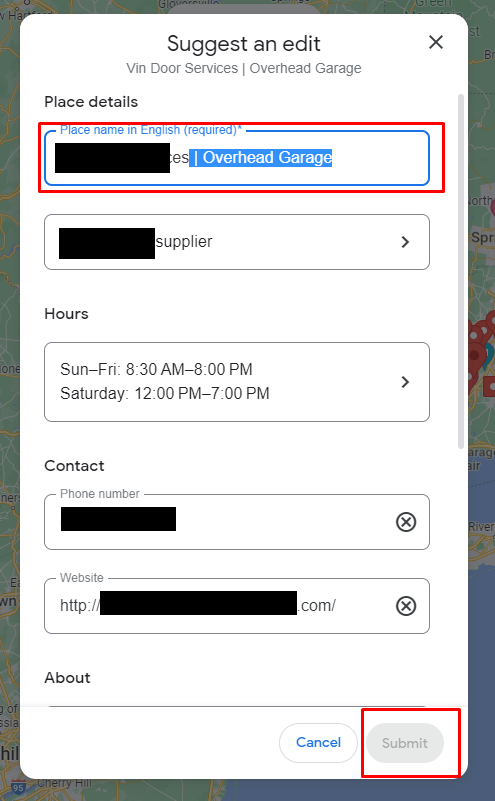
Editing a business name via the suggest an edit interface.
For fake or old listings, click Close or remove. Then click the appropriate option for the listing in question.
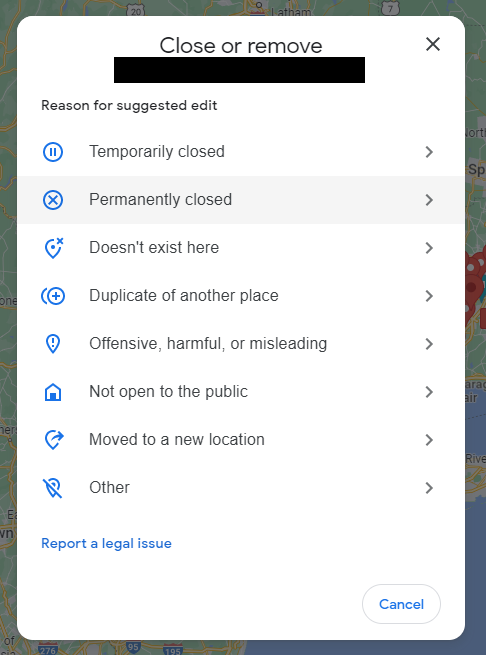
The different options available when reporting a business for removal.
Now, this part gets a little tricky and the correct answer can change. In the past, using “Doesn’t exist here” had a low success rate. More recently, both “Permanently closed” and “Doesn’t exist here” have become powerful options and are commonly used. Once you have reported the listings in question, you also want to submit a redressal form to Google. Making suggested edits has a strong chance of being reviewed by automation, and automation doesn’t always get it right. Submitting a redressal form has a strong chance of landing in the hands of a person to review your case. So completing both steps is important.
Conducting a False Competition Audit — Intermediate Level
Now that you understand how to conduct a false competition audit on a basic level, let’s take it up a notch. You might not see how bad false competition is in your market when in reality it could be the single thing holding your marketing campaign back. There are some markets where false competition appears monthly and the only solution is running an audit every month to report them.
So you know how to report any one listing through a suggest edit and the redressal form. What you will need now is a grid scan tool like Local Falcon or you can use the Teleport feature of GMB Everywhere. We suggest running a grid scan on 5 keywords and if you are still finding new listings to report, continue running scans. In general, running an audit on 5 keywords is strong enough to capture most of the false competition. Thinking about 5 keywords that are most valuable to you or 5 keywords that you know have issues with false competition is perfect. We would also suggest using 5 short‑tail keywords that are different from each other.
For example, if the listing is a personal injury attorney, good keyword examples are:
- Workers Compensation Attorney
- Slip and Fall Attorney
- Truck Accident Attorney
- Car Accident Attorney
- Personal Injury Attorney
Examples that would be less effective:
- Personal Injury Attorneys
- Personal Injury Attorney Miami
- Personal Injury Attorney Near Me
- Personal Injury Lawyer
- Personal Injury Attorney
While running these searches could produce some new false competition, odds are, you’re going to capture a majority of them with just “Personal Injury Attorney” and it’s more valuable going after something like “Car Accident Attorney.”
When setting up a grid scan it is recommended to use a 9×9 grid size using a 9 mile by 9 mile area. We find this is the most effective range for conducting a false competition audit. Be sure the grid scan is over the address used to verify the listing. For listings that show their address, the address used to verify the listing is the same. For listings that hide their address, you will have to manually move the grid scan over the address used to verify the listing. The grid tool you use won’t actually know what address was used. You can also use the Teleport feature of GMB Everywhere for it.
The next part is the tricky time‑sink part. When looking at competing listings, it is suggested to only look at listings that are in front of your own ranks. Certain grid tools do a better job at showing this data than others, but it does take time creating this list. The other option is to just go after all listings regardless of whether they’re in front or behind you. The theory would be, even if they’re behind you for your 5 keywords, they’re probably in front of you for some keyword combination out there. Just reporting and removing that listing removes it from all keyword combinations. Both logic paths are correct, but we personally prefer only going after competition in front of us.
Another way to think about it is, if a grid scan showed you on “20+” across the report, you could be 21st in maps, 100th in maps, or simply not have ranks at all. So it might not be as valuable to go after all listings if you don’t even know if you hold ranks for a given keyword.
Once you created your list, you would submit the suggested edits and the redressal form just like before. The difference is, you would want to compile a spreadsheet to submit to Google on the redressal form since you’re going to have more than just a few listings to report. Remember, the redressal form likely goes to a person, so if your report is sloppy and unreadable, the person will likely ignore it. The time spent on making a clean report for Google is worth it.
At this level, you will likely also want to track your results to see what’s being removed. We recommend checking in once a month to see what’s been removed and if the listing was removed, did it come back. Think of this audit as a very advanced game of whack‑a‑mole.
Conducting a False Competition Audit — Advanced Level
At this point you understand the value of a false competition audit. And you have probably run the audits yourself and realized how much time they take. The value is well worth the time, especially with false competition audits consistently ranked as one of the most impactful actions in Whitespark’s 2026 Local Search Ranking Factors report. But when it comes down to it, you or your team just might not have the time to complete the audit yourself every month. In this case, you can use a service like Local Business Protection to take on this work for you professionally. The advantage is, you and your team no longer have to put in the time to conduct the audits every month.
With a professional service, the audits will run monthly like clockwork. Every month, new grid scans will be run on the keywords you find important to your business and every month suggest edits and a redressal form will be sent out to Google on listings that indicate they might be false competition. The platform also checks daily for listings removed as well as if the listing comes back. The company also stays up to date on what works and what doesn’t as Google is ever‑changing.
Conclusion
Congratulations — you now have the knowledge to conduct a false competition audit and take one of the most impactful actions in gaining traction in Google Maps. As you begin to see listings removed, you will be shocked to see the results. Be sure to conduct the audits monthly. You might just be shocked by the ranking changes after a few removals.
Happy auditing! Visit our guides section for more similar articles.